Saturday, November 29, 2025

I tested Beyerdynamic’s new gaming headset – it’s an immersive, mid-market gem

Beyerdynamic MMX 150 Wireless: two-minute review

The Beyerdynamic MMX 150 Wireless is a multi-platform gaming headset that will unlock quality immersive audio. It also offers wired USB-C and low-latency connectivity via a USB-C dongle and a removable mic. While it’s already out in the UK, the US release date is yet to be confirmed.

For a mid-market headset with a list price of £159 (around $210), the MMX 150 Wireless is impressively immersive. When I was stalking opponents on Counter-Strike 2, the soundstage always felt precise, enabling me to detect the direction of firefights or distinguish footsteps as people attempted to sneak up on me.

But I would say it’s in action games where the MMX 150 Wireless really shows off its strengths. While playing The Outer Worlds 2, the world around me felt deep and richly layered. Reverberant industrial sounds and the idle chatter of NPCs are always perfectly positioned, making you feel like you’re sitting at the dead centre of an expansive sphere of sound. And effects are exquisitely detailed – the distorted dialogue of in-game voice recordings always feels convincingly conveyed, like you’re actually interacting with aged comms equipment.

The presets provided in the Beyerdynamic app help polish the sound up even further, even if the overall effect lands more on the subtle side compared to some of the best wireless gaming headsets. Upping trebles and mids, the Shooter preset did a credible job of making gun shots and footsteps even more distinct for when you want to sniff out enemies, while Action mode adds more gravitas, boosting bass and treble to give the world around you more substance.

Mic performance is more of a mixed result, however. Testing it out in-game and by recording some audio, the quality of its audio felt decent, if unexceptional. Its noise filtering was genuinely pretty impressive, though, capturing none of the background noise I was making, from key taps to loud, bassy music. The MMX 150 Wireless’s equivalent of transparency mode was a bit disappointing, though – even though it made my voice sound a lot clearer, it introduced a level of hiss that I’ve never heard from any of the best wireless headphones I’ve tested.
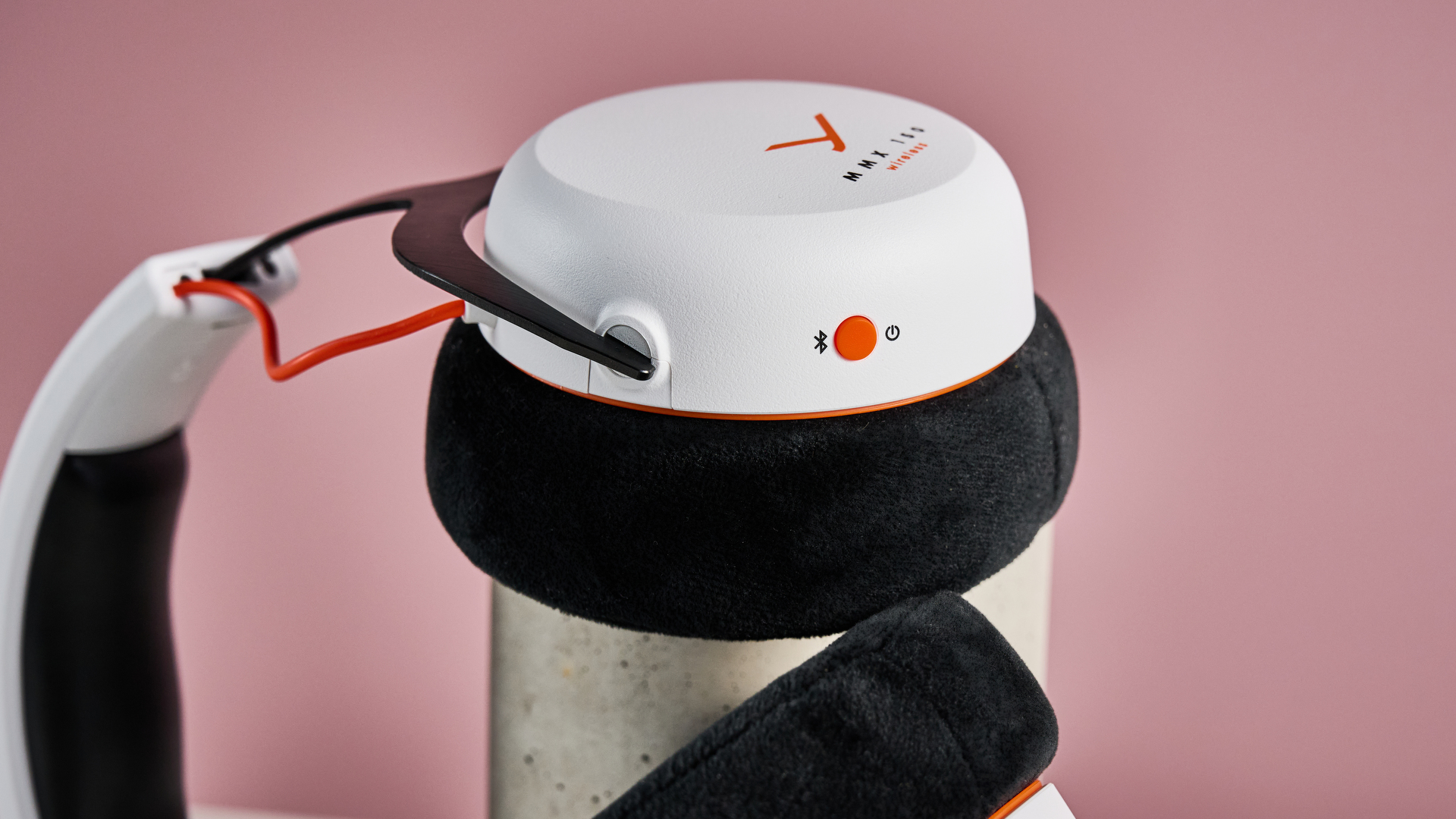
A closeup of the Bluetooth / power button on the Beyerdynamic MMX 150 Wireless.

(Image credit: Future)

Focusing more on its physical build now, the Beyerdynamic headset is seriously comfortable – I’ve had pillows that are less plush than these things. Thanks to the velour earpads, they’re super comfy, even during long gaming sessions, while the clamp force is just right for keeping them on your head without squishing your ears. Meanwhile, their height is easy to adjust to fit and offers a pretty expansive range, which is very helpful for my cumbersomely large cranium.

There are a few elements of the design I’m not a fan of, however. Aside from that cushy velour padding, the remaining materials of the MMX 150 Wireless feel a little flimsy – its plastic earcups echo every time you click the buttons, for example, slightly hampering the headset’s high-end feel. And while the white and black colorway I tested is a great match for the PS5, it’s ostentatiously gamer-y enough in its styling that I can’t really imagine myself using it for listening to music on the go.

When it comes to features, this Beyerdynamic’s app has a decent smattering. There’s the aforementioned sound presets, which cover gaming modes from Strategy to Racing and music modes from Bass to Smooth, as well as a custom five-band EQ. On top of this, it allows you to customize the functions behind button taps, switch Sidetone on and off, change the language of voice prompts, alter the auto shutdown time, and set the ringtone level.

Battery life is more than adequate for long gaming sessions. Despite Beyerdynamic listing it online as having a total life of 50 hours, its app actually gave the MMX 150 Wireless an estimated life of 68 hours. Having tested it by playing music over Bluetooth at 50% volume for a full day to see how rapidly its battery depleted, I found this estimate is actually pretty spot on, meaning the MMX 150 Wireless has a pretty generous battery life, especially for this price.

Ultimately, the Beyerdynamic MMX 150 Wireless is a strong performer for its mid-market price, offering detailed, immersive sound and a super comfy build. Sure, I’d generally like a slightly sturdier build from a headset of this price, and I’m not totally convinced by that noisy Sidetone mic mode. But if your biggest priorities are simply plunging yourself into your games and having spot-on situational awareness, you could do a lot worse.

Beyerdynamic MMX 150 Wireless review: price & availability

  • Launched on October 5, 2025 in the UK
  • US release date TBC
  • List price of £159

Having launched on October 8, 2025, the Beyerdynamic MMX 150 Wireless is already in the UK. Unfortunately, there’s no official release date that’s been announced for the US at the time of writing, but we’ll update this review when we have more information.

The MMX 150 Wireless has a list price of £159 – while that translates to around $210, the still unfolding landscape around tariffs makes it hard to accurately predict what the actual retail price will be. There are currently two colorways available for the headset: black and the white version tested here.
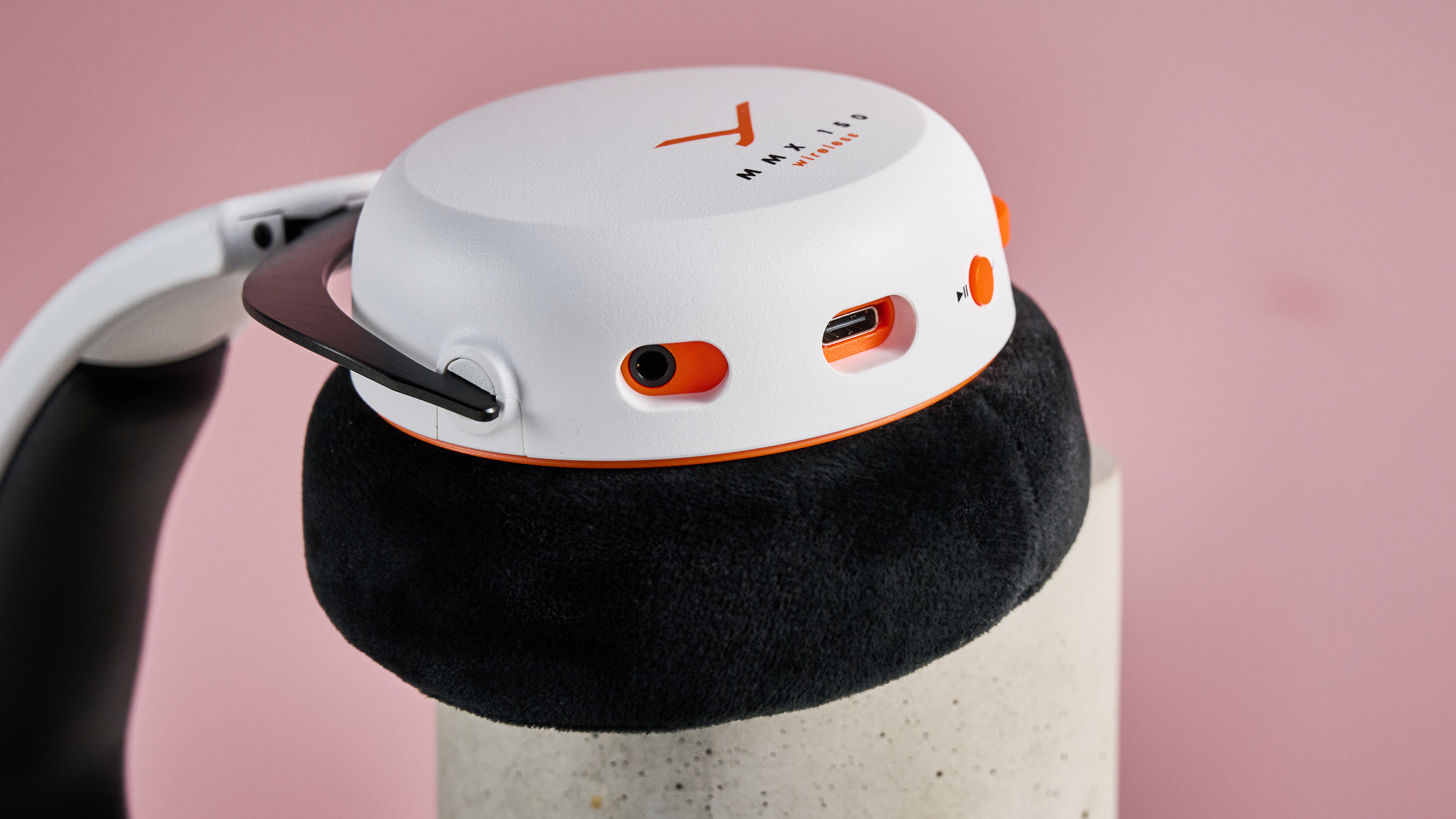
A closeup of the mic port, USB port and play button on the Beyerdynamic MMX 150 Wireless.

(Image credit: Future)

Beyerdynamic MMX 150 Wireless review: specs

Price

£159 (around $210)

Weight

0.7 lbs / 336g

Compatibility

PC, Xbox Series X/S, PlayStation 5, Playstation 4, Nintendo Switch 2, Steam Deck

Connection type

Bluetooth, Wired (USB-C), low-latency 2.4GHz wireless (dongle)

Features

Five-band EQ, 10 sound presets, Sidetone mode, custom button settings, plug-in mic with noise reduction

Battery life

50 hours

Software

Beyerdynamic app

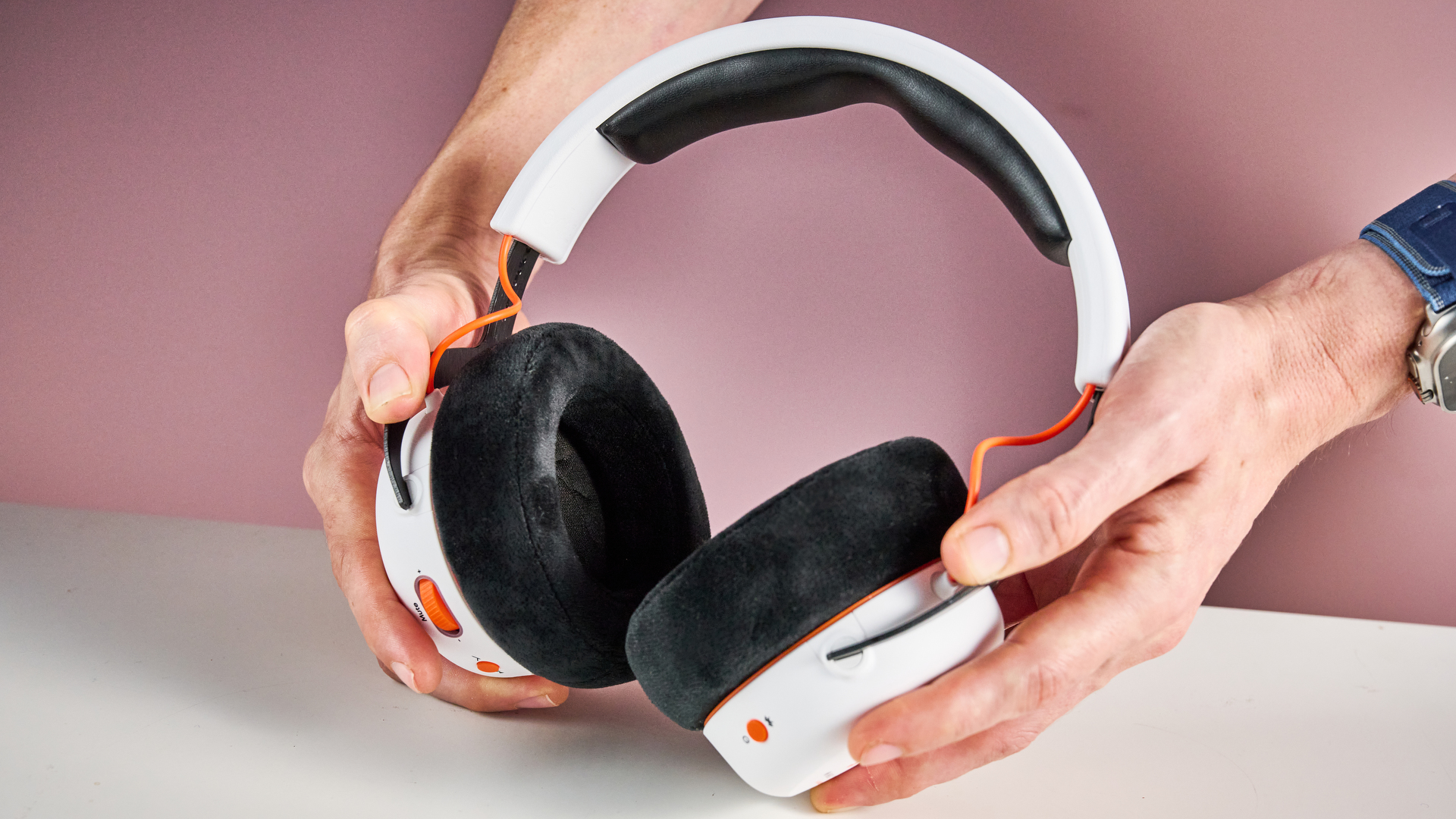
The Beyerdynamic MMX 150 Wireless held in a man's hands, showing the inside of the cups.

(Image credit: Future)

Beyerdynamic MMX 150 Wireless review: design / features

  • Comfortable and cosy
  • 68-hour battery life
  • Some materials feel a little cheap

When I put the Beyerdynamic MMX 150 Wireless on, the first thing I noticed was how cosy it feels. Honestly, it’s a little like you’re slipping your head into a velour cocoon. While those earpads aren’t necessarily the most subtle look, I cannot argue that they’re not incredibly comfortable. My only concern here is whether they’ll get a little toasty when summer rolls around – I’m not sure they’ll be particularly breathable or sweat-wicking.

And it’s not just the earpads that feel plush and comfortable: this continues throughout the MMX 150 Wireless’s design. Not only is it lightweight – clocking in at 336g – but its clamp force is pitched just right, keeping them well positioned on your head without unpleasantly squishing your ear cartilage.

It's also easy to adjust to fit. Some brands overthink this – one of the few points I criticized the super-affordable Turtle Beach Atlas 200 on recently was how it was impossible to adjust its height while you were wearing it. Beyerdynamic seems to recognize that sometimes the simplest solution is the most elegant: the earcups here simply raise and lower on a notched band, making it trivially easy to tweak them to the perfect height for you.

Unfortunately, sometimes this no-nonsense approach to design is less effective. In contrast to the luxurious feeling of the headset’s padding, the harder materials feel a little bit cheap. This is most pronounced when using the Control Wheel on the left cup – it’s a shade too clicky, and I found the noise resonates through the plasticky casing. Using more substantial materials here could have definitely made the experience of using these controls feel a little more premium.

And while this may be more of a personal preference, I’m also not totally keen on the MMX 150 Wireless’s styling, with the headset leaning a little too far into the gamer aesthetic for my liking. Don’t get me wrong: there’s no flashing RGB lighting or Cybertruck-esque sharp angles here. But the orange highlights, exposed wires, and the white and black colorway of the model I tested make it pretty clear this is a gaming headset first and foremost – you’re not going to be able to use it to listen to tunes on the subway without drawing a glance or two.

Moving on to the MMX 150 Wireless’s features, it has a decent range of capabilities, even if it’s maybe not quite as talented as some premium headsets.

Its connectivity options are pretty great. You can connect it to any compatible device via Bluetooth 5.3, and for the odd gadget that doesn’t have wireless connectivity, you can hook it up via its USB-C to 3.5mm jack cable. Perhaps the best option for committed gamers though, is its included wireless low-latency dongle – although Beyerdynamic doesn’t get specific about how much latency we’re talking about here, it promises negligible lag between the visuals and audio, something competitive gamers will definitely appreciate.

On paper, the MMX 150 Wireless’s battery life sounds unexceptional for a wireless gaming headset, with many topping its billed 50-hour life. However, when I fired up the Beyerdynamic app, it actually gave me its estimated life on a full charge as being about 68 hours.

Wanting to put this to the test, I set the headset playing music over Bluetooth at half volume for most of the day to see how much it would drain. It took seven hours and five minutes for its charge to drop to 90%, putting its total battery life at something like 71 hours and 10 minutes. Even taking into account the fact that its battery likely doesn’t discharge evenly, that means it will likely deliver that 68-hour life, enabling it to keep up with more headsets on the market.

The Beyerdynamic app offers a decent array of features and sound profiles, enabling me to customize various functions on the MMX 150 Wireless. First off, it offers up access to the headset’s five-band EQ and array of sound presets – these cover a range of scenarios, whether that’s bassy music, spoken words, or game genres like shooters, racing games, or strategy.

The app also allowed me to set which tap patterns of the multi-function button I wanted to play or pause audio, skip tracks back or forward, and switch audio sources. On top of this, it offers options for switching Sidetone on and off – Beyerdynamic’s name for its mic-boosting transparency mode – switching language of voice prompts, setting the headset’s auto shutdown tim,e and dialing in ringtone level.
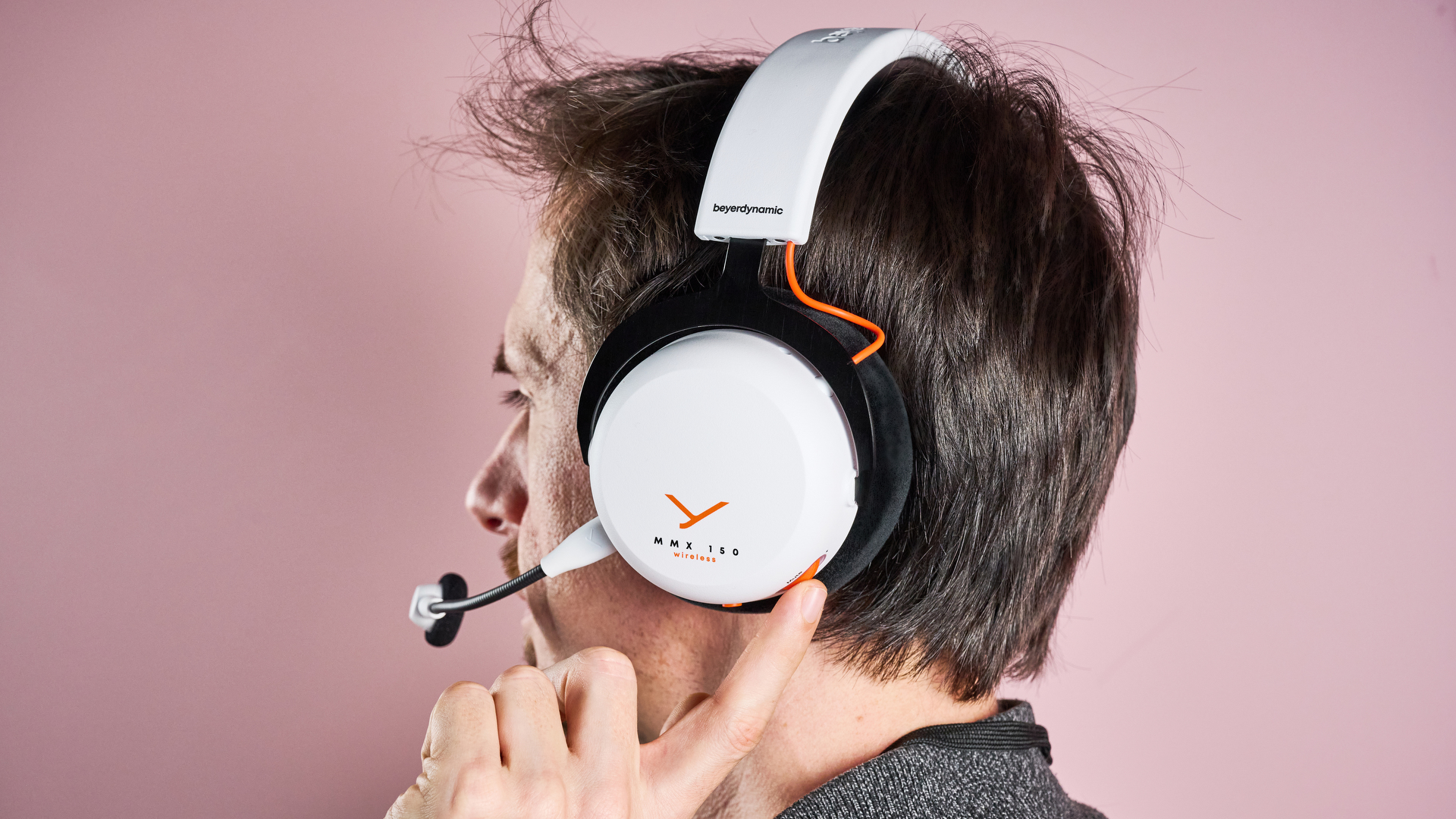
The Beyerdynamic MMX 150 Wireless on a man's head from a rear angle; he is spinning the volume wheel on one earcup with one finger.

(Image credit: Future)

Beyerdynamic MMX 150 Wireless review: performance

  • Rich, immersive sound
  • Decent sound presets
  • Mic transparency mode a bit hissy

I’m always a bit wary when headsets throw around words like ‘immersive’ without details of specific spatial audio technologies. However, in the Beyerdynamic MMX 150 Wireless’ case, it’s hard to come up with an adjective that feels more apt – strapping it on really does plunge you into the middle of the games you’re playing.

Firing up The Outer Worlds 2, I was impressed with how alive the worlds around me sounded. Strolling around my ship, the crackle of electricity and whirring of machinery really made me feel like I was inhabiting an authentic, mechanical vessel. And the audio is detailed enough to feel visceral at times – carrying out stealth kills, the whoosh of the knife, and the pained gurgle of enemies was just unsettling enough to impress a scintilla of guilt on my jaded conscience.

This sense of immersion is very much supported by the precision of the MMX 150 Wireless’s soundstage, with its positioning of sounds always feeling spot on. During Counter-Strike 2 matches, I found it easier to pinpoint where enemies were than with cheaper headsets. Not only was locating the direction of gunfire much more straightforward, but I could easily tell by the sound of footsteps when someone was attempting to sneak up behind me, giving me a decent edge.

The low-latency dongle made this even more appreciable. Like I say, Beyerdynamic hasn’t explicitly laid out what kind of latency time the USB dongle is capable of, but at least subjectively, I noticed very little gap between the visuals on screen and the crack of shotguns or the thud of the R8 Revolver.

Sound presets were pretty effective, although I’d say their impact was subtle rather than transformative. When applying the Adventure preset during The Outer Worlds 2, it boosted the bass and treble slightly, giving those atmospheric sound effects a soupçon more impact and drama. Conversely, the Shooter preset upped the trebles and mids, emphasising the most useful frequencies for reacting to gunshots in Counter-Strike 2 – although this is perhaps less fun than the booming bass some headsets grant to the game’s rifle shots.

So the Beyerdynamic produces very decent sound for its price – but how well does it detect it? I’m pleased to say that the headset’s mic works well, capturing my voice with decent clarity. I was genuinely impressed with its noise filtering: it didn’t pick up the noise of me hammering away at my keyboard, and even my attempts to overwhelm it by playing pumping EDM in the background barely registered.

While I would have preferred a fold-to-mute mic design, its mute function still works well, cutting out instantly when you click in the Control Wheel. Annoyingly, I did find the action of the buttons and wheel does get picked up by the mic, though, appreciable at the other end as a definite echoey clunk.

The Sidetone mode mentioned above fulfills its brief reasonably well. It definitely made my voice less muted when speaking with the headset on, making it sound much more natural. I’ve clearly been a bit spoiled by the transparency mode of modern wireless headphones, though – Sidetone mode is a much blunter instrument by comparison, introducing a degree of background hiss that I absolutely wouldn’t tolerate from a pair of Bluetooth headphones.

All in all, the Beyerdynamic MMX 150 Wireless offers very decent performance. I enjoy being plunged into its sonic soundscapes, particularly in games with soundtracks that are suitably immersive enough to play to their strengths. It is a shame that the mic isn’t quite as polished, though: it’s the one area where I could definitely tell I was using a mid-range headset, rather than a more premium one.
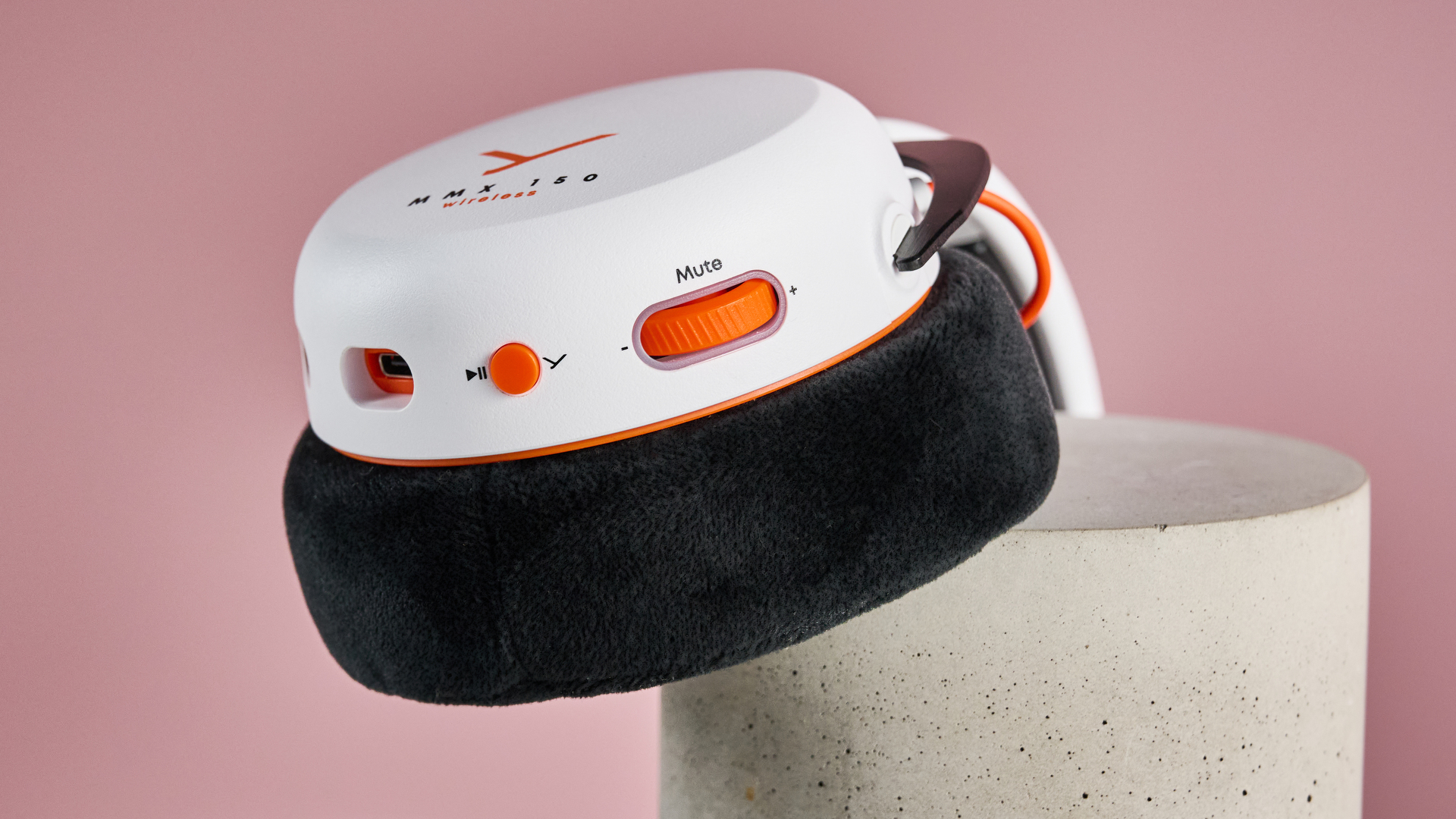
A closeup of the USB port, play button and volume wheel on the Beyerdynamic MMX 150 Wireless.

(Image credit: Future)

Should I buy the Beyerdynamic MMX 150 Wireless?

Buy it if…

You want to be plunged right into your games
With its excellent soundstage, the MMX 150 Wireless puts you right at the heart of the action, giving you an excellent sense of space and fully immersing you in the action.

You prioritize comfort
Not only does this headset cosily cradle your ears with its velour earpads, but its clamp force is just right, keeping them in place without exerting excess pressure on your ears.

Don’t buy it if…

You’re after a sturdy, premium-feeling build
Despite this comfort, though, the rest of the MMX 150 Wireless’s materials leave something to be desired, feeling a little lightweight and plasticky for this price.

You want an unimpeachable microphone
Don’t get me wrong: the MMX 150 Wireless’s mic captures your voice well. But the clonky echo of its buttons on your audio stream and the hiss of its Sidetone mode slightly mar the experience of using it.

Beyerdynamic MMX 150 Wireless review: also consider

Beyerdynamic MMX 150 Wireless

HyperX Cloud Alpha Wireless

SteelSeries Arctis Nova 7P

Price

£159 (around $210)

$199.99 / £189.98

$199.99 / £174.99

Weight

0.7 lbs / 336g

0.7 lbs / 318g

0.7 lbs / 325g

Compatibility

PC, Xbox Series X/S, PlayStation 5, Playstation 4, Nintendo Switch 2, Steam Deck

PC

PC, PlayStation 5, Playstation 4, Nintendo Switch 2, Steam Deck

Connection type

Bluetooth, Wired (USB-C), low-latency 2.4GHz wireless (dongle)

Wireless (dongle)

Bluetooth, Wired (USB-C), low-latency 2.4GHz wireless (dongle)

Features

Five-band EQ, 10 sound presets, Sidetone mode, custom button settings, plug-in mic with noise reduction

DTS Headphone:X Spatial Audio, noise-cancelling mic with LED status indicator

EQ, 200+ sound presets, Sidetone mode, retractable mic with noise reduction

Battery life

50 hours

300 hours

38 hours

Software

Beyerdynamic app

HyperX Ngenuity

Arctis Companion App

HyperX Cloud Alpha Wireless
Not only does the HyperX Cloud Alpha Wireless offer fantastic audio, but it makes the Beyerdynamic MMX 150 Wireless’s battery life look positively ephemeral, offering a truly absurd 300 hours. And while its list price was initially higher than the MMX 150’s, in the US it has spent much of the last year at under $150, making it a bit of a bargain.

Read our full HyperX Cloud Alpha Wireless review

SteelSeries Arctis Nova 7P
If you want a headset that offers that more premium, substantial build but – crucially – don’t want to pay premium prices for the privilege, this might be the headset for you. It’s made from sturdy metal – it feels robust without sacrificing comfort, while offering true spatial audio and hefty bass. The drawback? It’s only compatible with PC and PlayStation, so Xbox or handheld gamers will want to look elsewhere.

Read more in our full SteelSeries Arctis Nova 7P review

How I tested the Beyerdynamic MMX 150 Wireless

  • Tested it over several days
  • Tried it out with a variety of devices and games
  • Assessed EQ modes and record mic quality

I tested the Beyerdynamic MMX 150 Wireless over the course of several days. First off, I tried the headset out with a range of games, including newer and older titles such as The Outer Worlds 2, Counter-Strike 2, The Witcher 3: Wild Hunt - Complete Edition, and Two Point Museum. I also tried it on multiple platforms, including our Acer Predator Helios 300 gaming laptop, my Steam Deck, and my PlayStation 4.

To test out the headset’s features, I downloaded the Beyerdynamic app and played with its various settings. I also used it to test out the EQ and sound presets, comparing them to a neutral EQ for the recommended genres of game. Additionally, I tested out the microphone by recording myself talking while gaming, making sure to also test the mute function and how well it isolated my voice from background noise.

I have plenty of experience when it comes to gaming headsets. First off, I’ve been reviewing audio-related gadgets for well over five years and using them for much longer for both listening to audio and making music. Secondly, I’ve been an avid console and PC gamer for over a third of a century – which is a truly terrifying realization.

  • First reviewed: November 2025
  • Read more about how we test
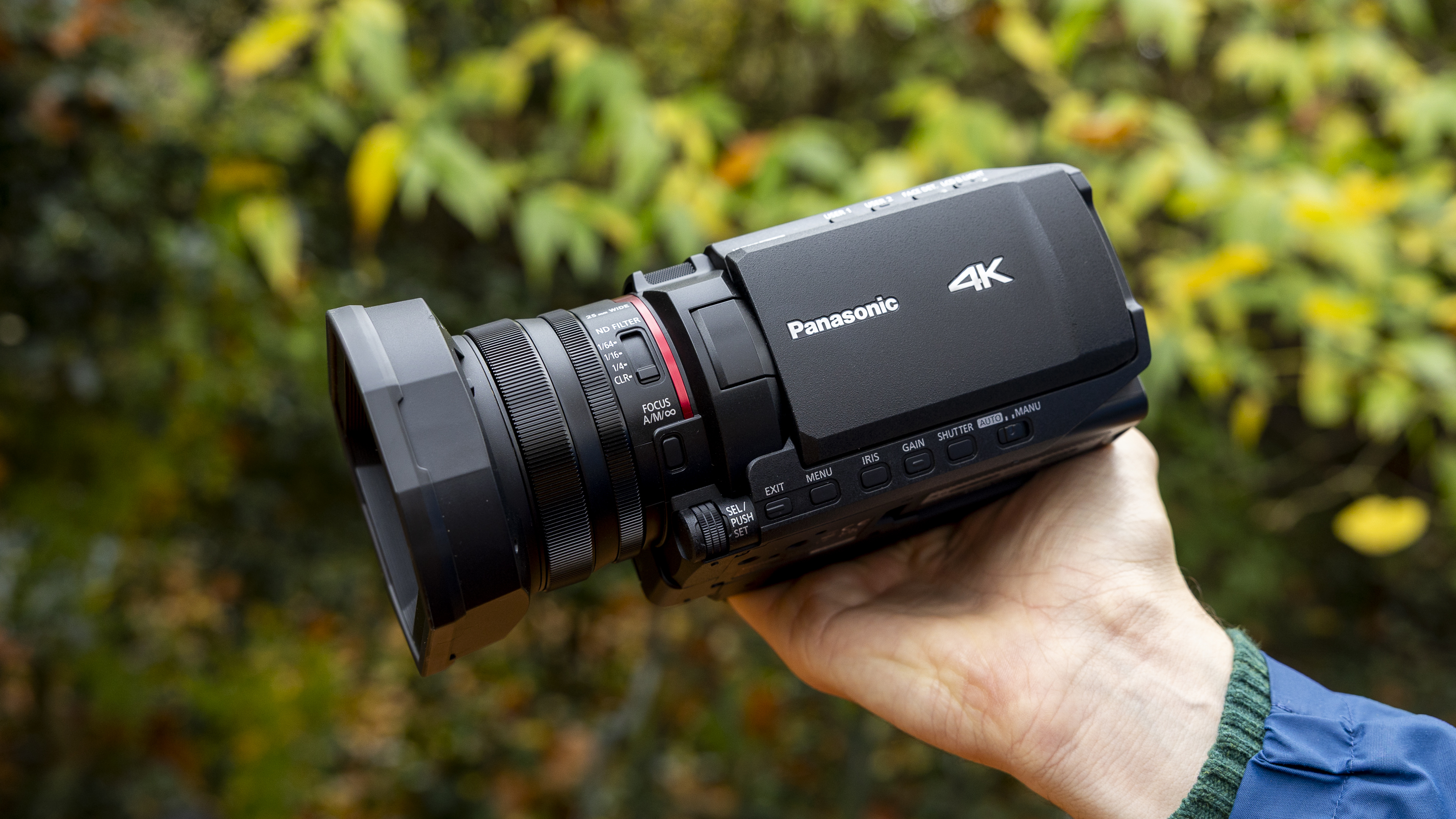
I was blown away by the zoom on the Panasonic HC-X1200 – it almost makes the case for a full camcorder comeback

Panasonic HC-X1200: two-minute review

I’ve been testing camcorders for over five years, to which you might respond, "Aren’t camcorders a relic from a former era?" And in some ways you'd be right. But there's still plenty of life in the product category, and filmmakers who like the traditional handling and built-in zoom of a camcorder will find much to enjoy in Panasonic's HC-X1200.

Even for a seasoned reviewer like myself, though, the HC-X1200's appeal isn't immediately clear. This relatively new and lightweight Panasonic model targets the serious creator or event videographer who needs rock-solid reliability and modern specs without jumping into the $2,000 / £1,500 price bracket.

There are few real video 'features', apart from basic face tracking. And without mod cons like Wi-Fi, this isn't the tool for fast-paced content creators. I like a simple workflow, and the HC-X1200 is certainly easy to pick up and use in full auto mode, with the option to work in manual for more advanced users.

A core strength here is, thankfully, image quality. I was fairly impressed that the camcorder offers 4K recording at 60 frames per second (4K/60p) with 10-bit internal recording, especially since similarly-priced models max out at 4K 30p.

This combination smooths out action footage with enough color latitude for grading later on, although it's nothing like as fast as you'll get from a top-tier action camera.

The main draw of camcorders, as I say, is their built-in zoom range. Sure enough, the HC-X1200’s built-in 24x optical zoom is something you won't get from a mirrorless camera without spending a fortune on lenses that are likely very heavy, too.

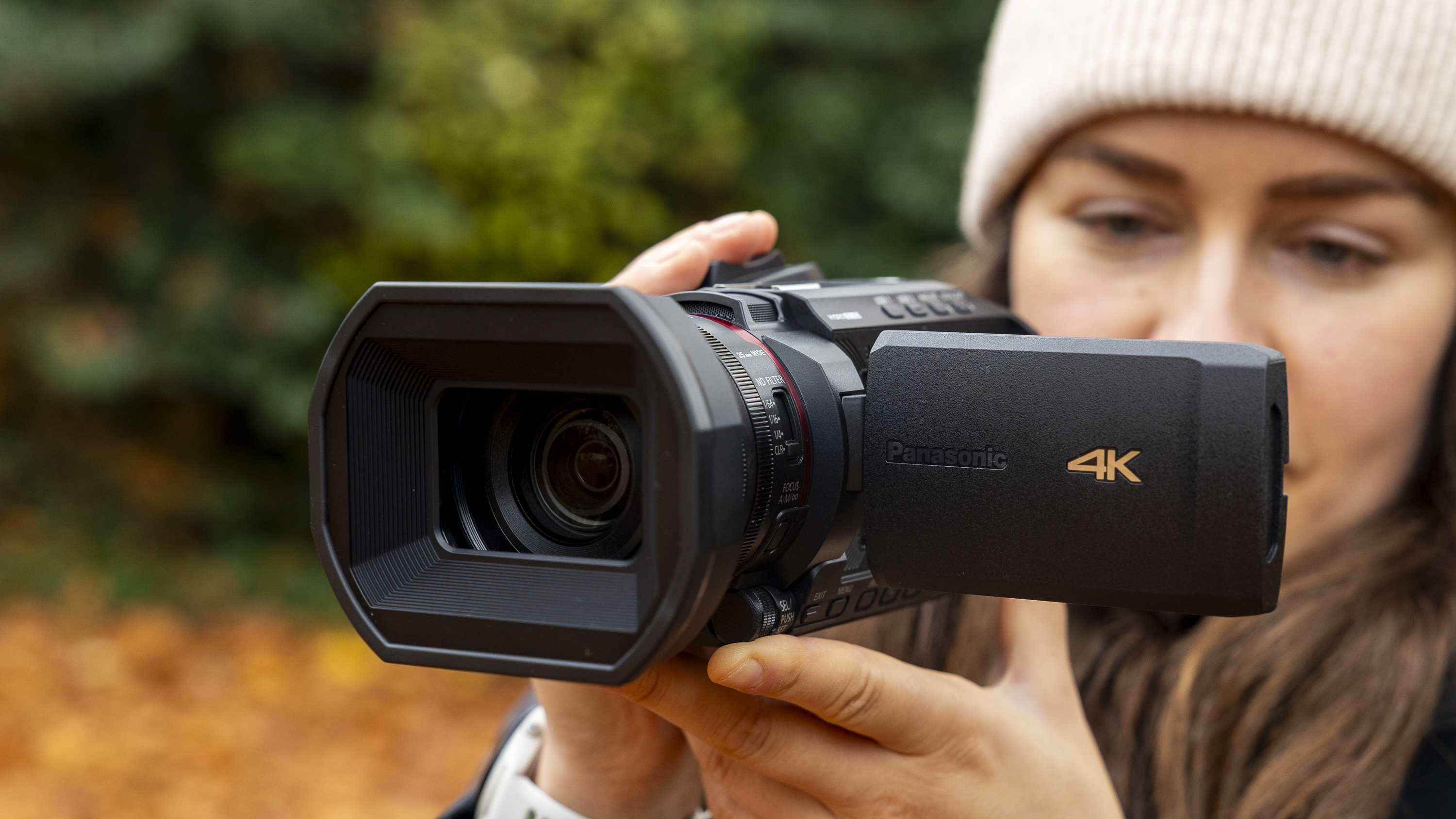
It's also worth noting that the HC-X1200's rivals max out at 20x zoom. If you’re an event or documentary shooter, or a wildlife enthusiast as I am, this is the best video camera for zooming in exceedingly far with clarity, stability, and speed. In 35mm terms, it's the equivalent of having lenses ranging from a 25mm wide-angle all the way to a 600mm telephoto in your bag.

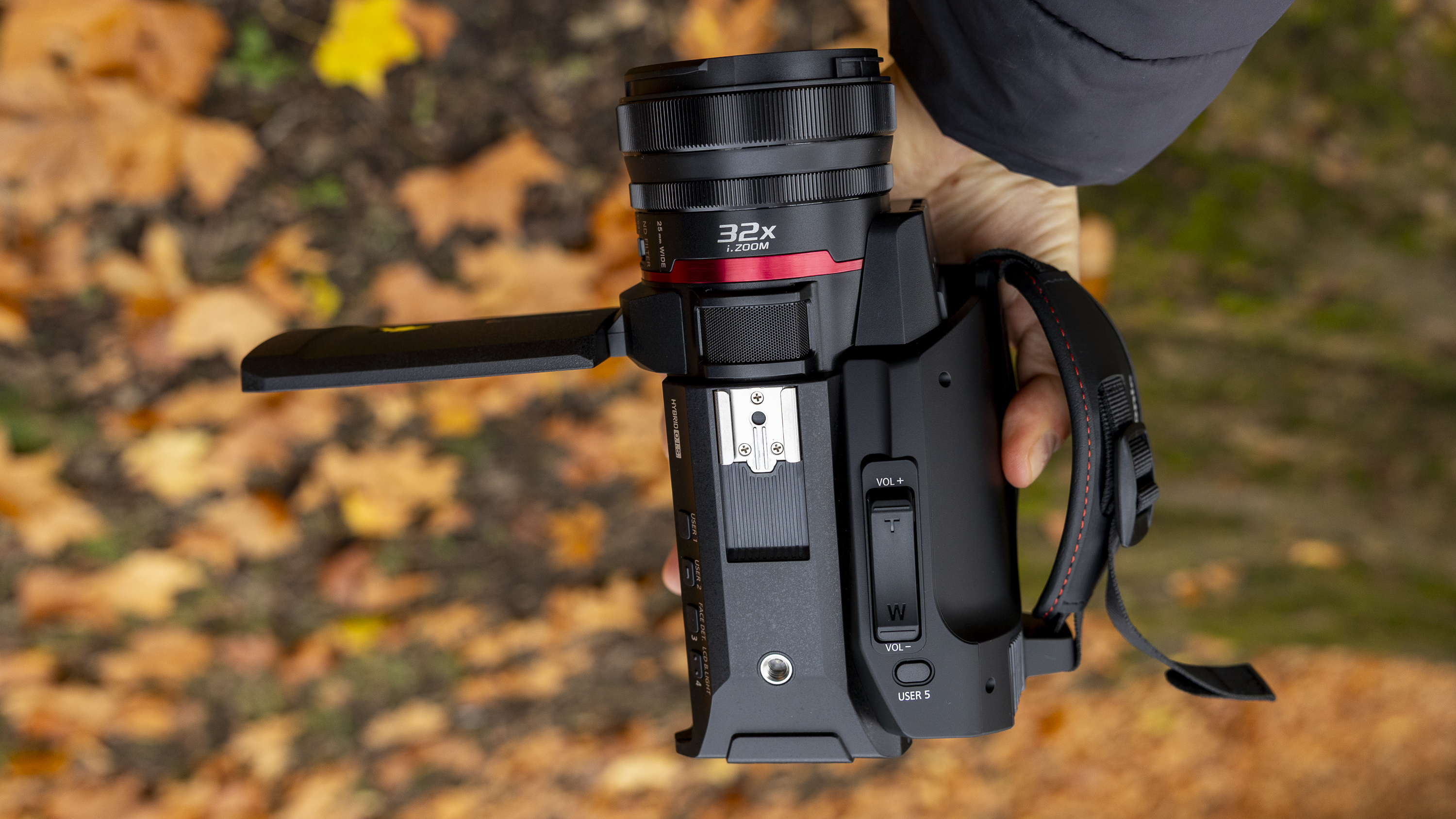
The Panasonic HC-X1200 camcorder held by a female photographer against an orange autumnal backdrop

(Image credit: Future)

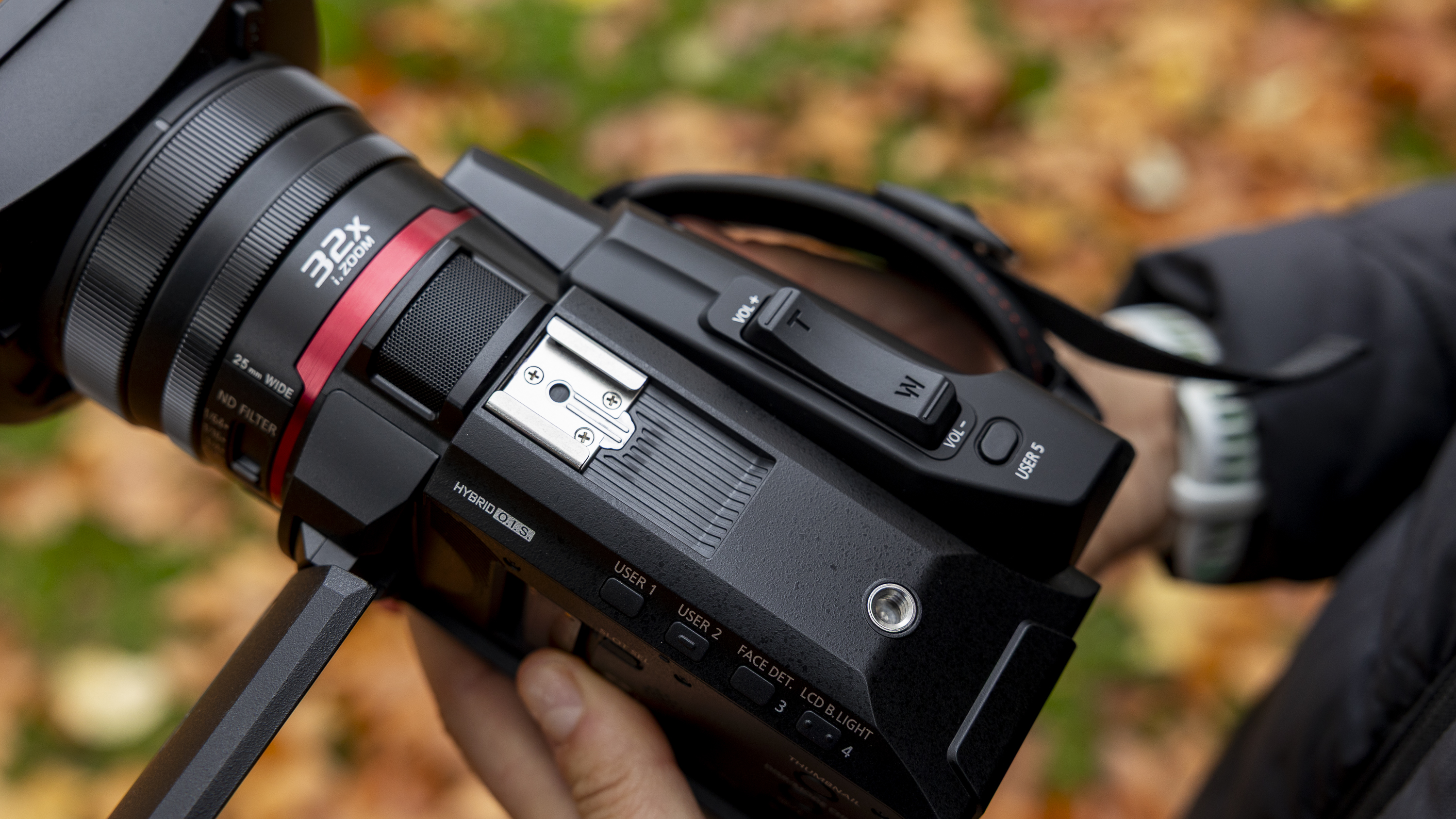
The HC-X1200's design also incorporates three steps of built-in ND filter, and the excellent 5-axis Hybrid OIS. is impressive for static handheld shots and walking scenes.

I didn't get the chance to shoot a wedding during my review loan period with the camcorder. Still, I think I’d be happy to use it for long events like weddings or conferences without worrying about the battery dying or the unit overheating, not least since the heat-dissipating design kept it totally cool while shooting long testing clips.

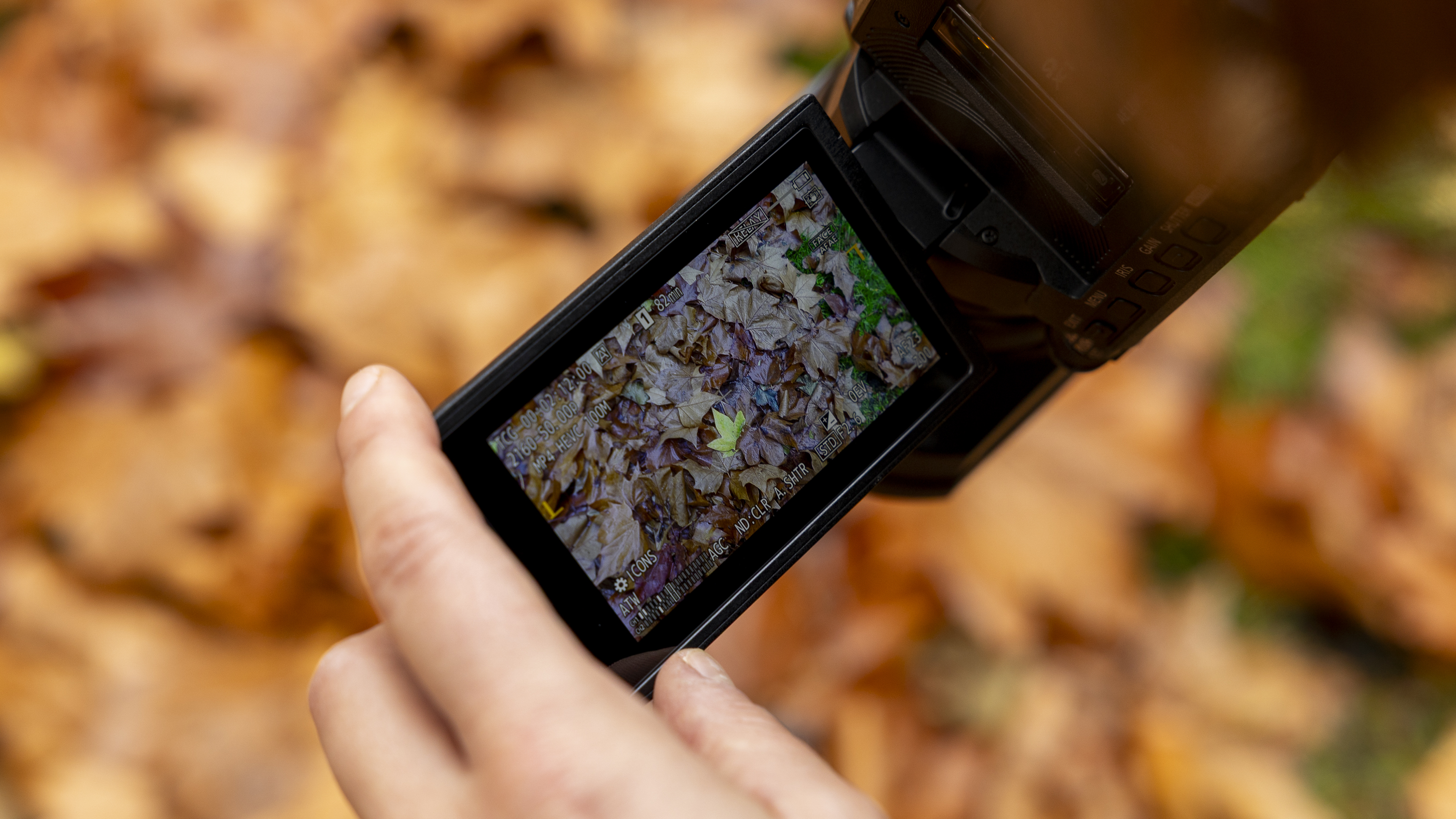
The HC-X1200 is a relatively affordable camcorder, and that’s because it makes some obvious compromises. Without a proper electronic viewfinder (EVF), it’s not always easy to see settings and frame up scenes in bright sunlight, especially since a lot of data on the screen is printed in tiny writing.

Good video requires good audio, but there are no professional XLR audio inputs. Instead, there’s one 3.5mm mic jack, which means relying on external recorders or less high-end microphones if you’re working on projects where audio is critical. If you're shooting primarily for home or family videos, though, the audio is just fine.

The HC-X1200 is a good-value portable camcorder. Whether you’re new to filmmaking and want something with a long zoom, or you like the traditional handling, the HC-X1200 is a reliable option for long-form capture. Just be prepared to manage audio externally, and work primarily in well-lit conditions.

The Panasonic HC-X1200 camcorder being taken out of the box

(Image credit: Future)

Panasonic HC-X1200: price and availability

  • Priced at $1,299.99 / £1,099 / AU$2,399
  • Lens hood included
  • Announced in January 2025

The Panasonic HC-X1200 was announced in January 2025 alongside two new 4K camcorders, the HC-X1600 and HC-X2100. It costs around $1,299.99 / £1,099 / AU$2,399.

The HC-X1200 is the entry-level model among these three Panasonic camcorders, without a viewfinder, handle unit, or XLR mic ports. It also lacks Wi-Fi, which feels like a misstep given that this comes as standard on cheaper rival camcorders and creator video cameras.

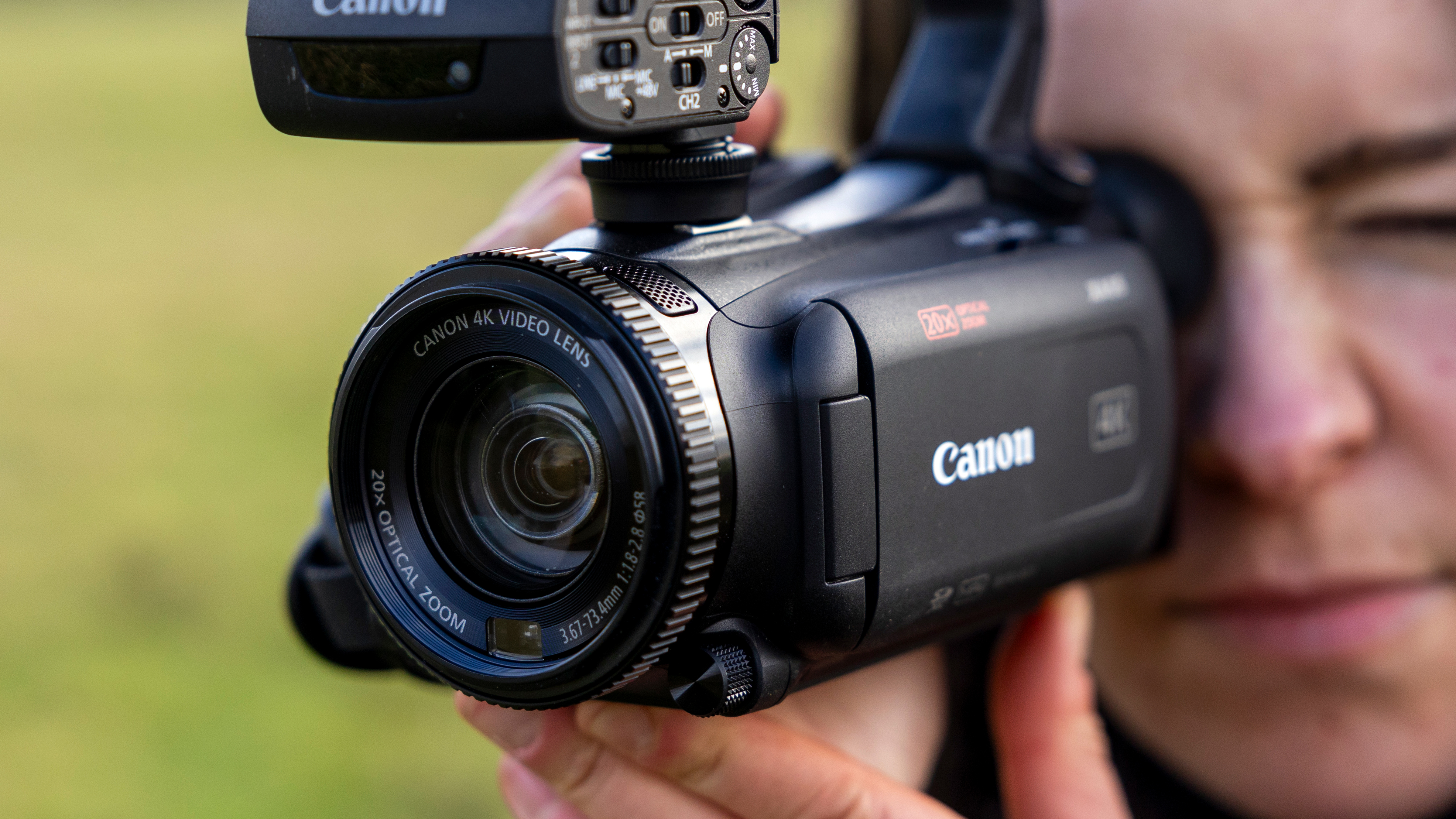
By my maths, the HC-X1200 is one of the most affordable camcorders for shooting 4K at 60 frames per second. The built-in ND filters also add a lot of flexibility for controlling exposure in bright light. Competing models priced near or below it (the Canon HF G70 or Sony AX43) are typically limited to 4K/30p, and both of those max out at 20x optical zoom power.

Panasonic HC-X1200 specs

Panasonic HC-X1200 specs

Sensor:

1/2.5-type (inch) MOS

Effective pixels:

8.29MP

Optical zoom:

24x

F Value:

f/1.8-f/4

Stabilization:

5-axis hybrid OIS

Memory card:

SDHC/SDXC (Up to 512GB)

Recording formats:

MP4, AVCHD

Maximum recording quality:

100 Mbps for 4K 59.94p/50p

Dimensions:

3.7 x 5.1 x 8.2 inches / 893 x 129 x 209mm (H x W x D)

Weight:

1.76lbs / 800g

Panasonic HC-X1200: Design

  • Light at just 800g, but not ultra-compact
  • Heat-dispersing design for continual recording
  • Two manual control rings

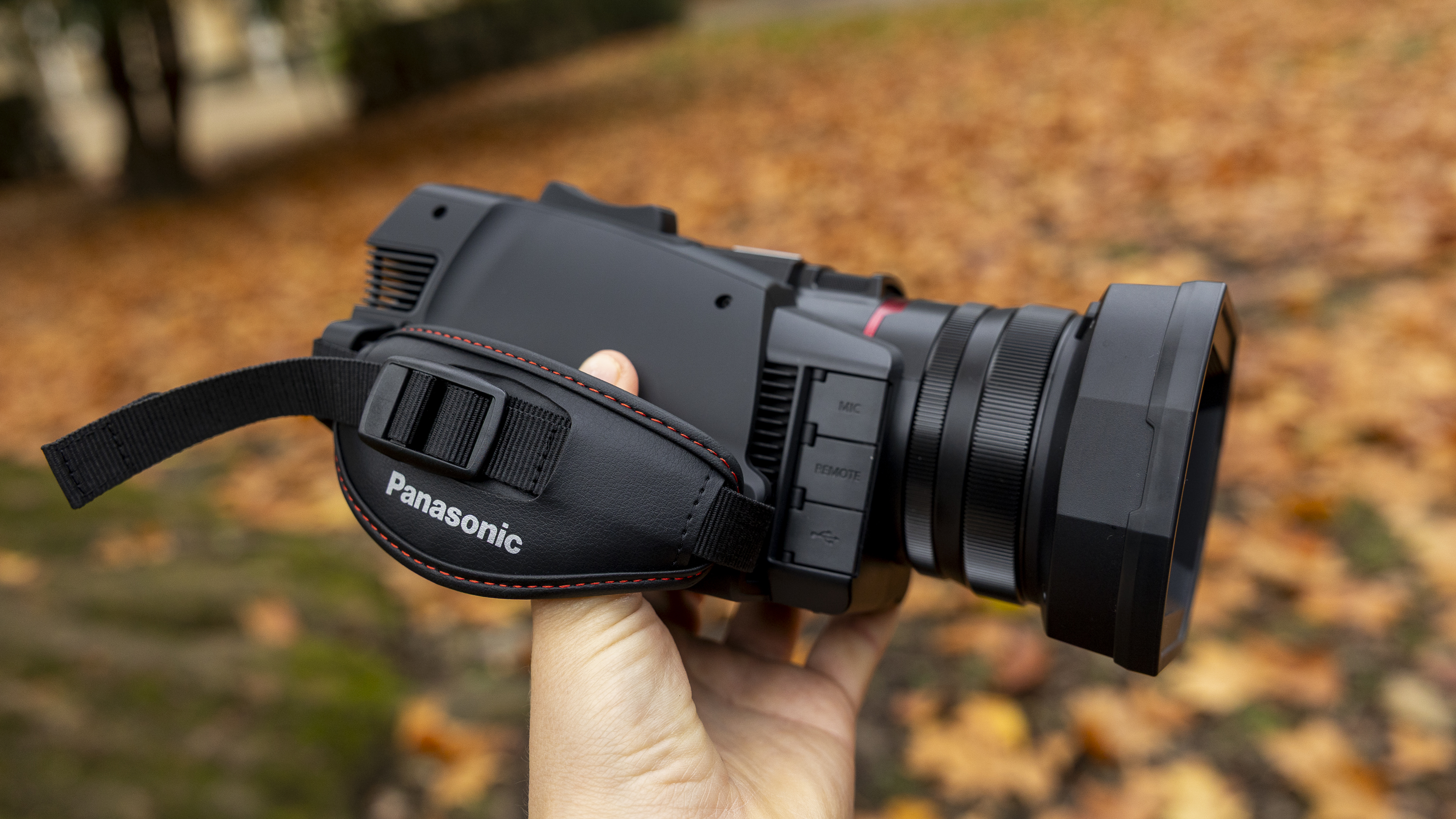
The Panasonic HC-X1200’s form resembles a classic camcorder. Made from matte black plastic, the body is long and barrel-shaped, and there’s an adjustable padded strap to aid stable handheld use (right-handed functionality only, though), with a pull-out, articulating LCD screen on the left of the body.

The HC-X1200 looks and feels similar to the Panasonic HC-X1500, which I’ve also tested, but comes in at a lighter weight of 1.76lbs / 800g. Some of the HC-X1500’s added weight comes from the viewfinder and eyecup, and the HC-X1200 is designed as a compact, body-only model, doing without the XLR-equipped handle unit found on its siblings (the HC-X1600 and X2100).

Panasonic calls it a “lightweight 4K 60p palm-style" camcorder, and while isn’t heavy, it might feel cumbersome to use at first if you’ve come from a vlogging-style camera. You’ll need a long padded bag to carry it, too. But the benefit of a camcorder like this is that everything is in the one unit, so you can forget carrying (and swapping out) extra lenses.

On the top is a chunky raised zoom rocker, which I found responsive, but not as naturally placed as on some camcorders. My index and middle fingers had to curve around slightly to reach it, but your mileage may vary.

The HC-X1200 is aimed at prosumers rather than total beginners, so there’s a good array of physical buttons on the camcorder body. There are no fewer than five customizable user buttons on the top, too, which can be set via the menu for controlling functions like face detection and enabling image stabilization.

Several of these are already preset, making them optional, but it’s a good thing to be able to customize the handling for your own preferences, especially since it’s harder to find these buttons in low light.

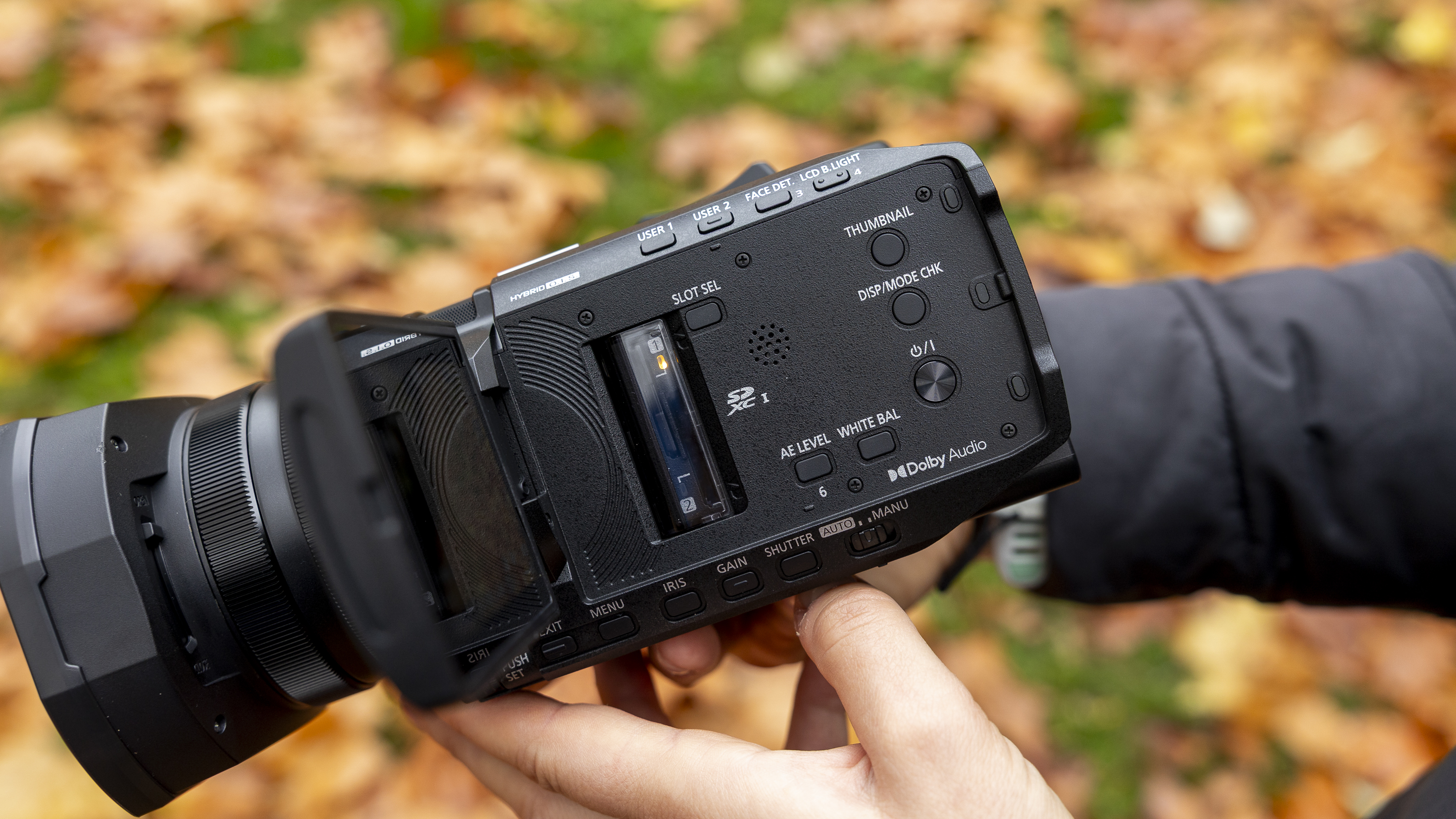
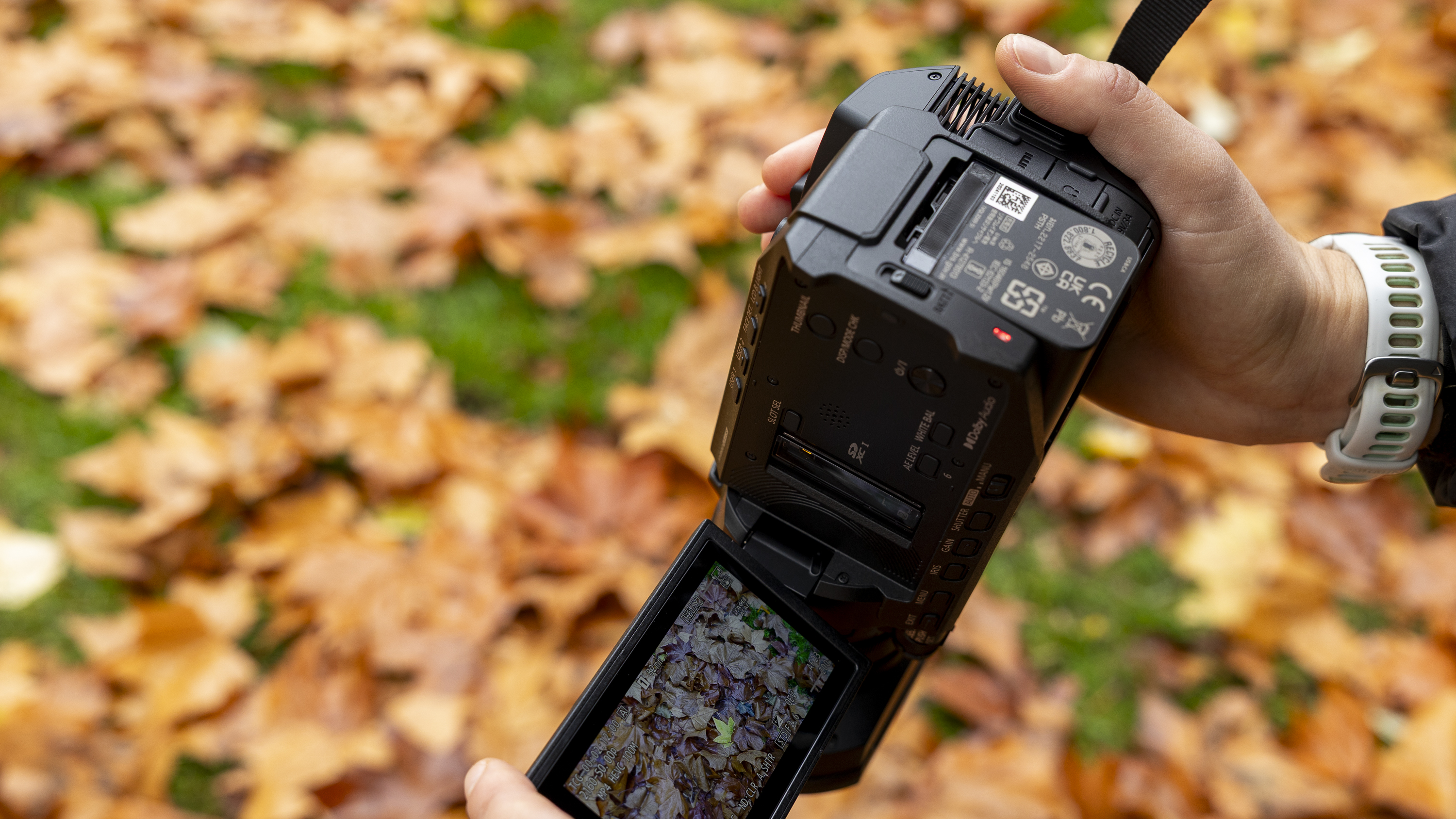
Before you even pull out the LCD screen, there are more buttons underneath on the left-hand side, including for the menu, iris, gain, shutter, and a toggle to switch between auto and manual exposure mode. The Menu button is the one you’ll likely use the most, and I would have liked to have felt it raised more than the others to make it easier to find without looking. Small things, though.

Fold out the LCD and there’s the on/off button (presumably positioned as such to stop you pressing it accidentally when the LCD is stowed away), a playback button, a toggle for displaying more or less info on the screen, and, as with most camcorders around this price point, dual memory card slots covered by a slide across a plastic window. A light illuminates to indicate which of the two SD cards is actively recording, which is a nice touch.

The 3.5-inch touch-sensitive LCD monitor is bright, detailed, and fully articulated, which means you can shoot pieces to camera or at low angles easily. As a more compact model, the Panasonic HC-X1200 notably skips an electronic viewfinder, but for this class of camera the generous touchscreen compensates.

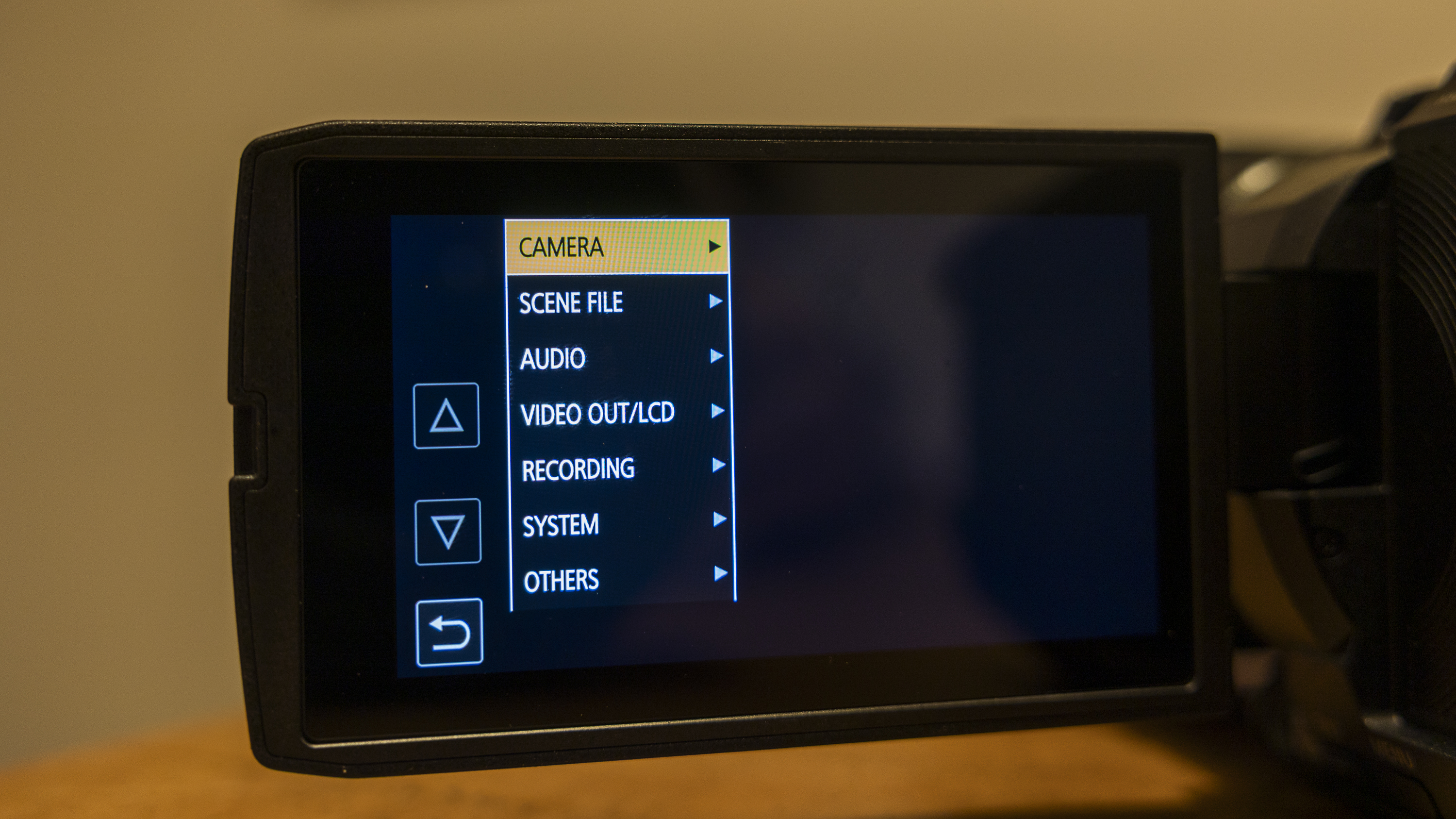
My main complaint is the responsiveness of said screen and the layout of the menus, which at times felt slow, confusing, and outdated to a modern user. It’s a shame Panasonic couldn't spend time coming up with a more user-friendly experience, but it’s not a dealbreaker.

At the rear of the camcorder is the raised recording button (easy to find without looking), plus a full HDMI port, USB-C power port, and single 3.5mm stereo mini jack for external audio input. In some ways, it’s a shame that professional XLR inputs are reserved for the X1600/X2100 handle. However, for a camcorder of this size, it keeps the profile sleek. Underneath, there’s also a standard tripod thread, and it’s a great bonus to be able to check the battery’s capacity with a quick press of the “check button”.

The highlight for me when using the HC-X1200 were the dual manual rings on the lens barrel, which are both smooth and very tactile to use, thanks to the notched markings all the way around them. The ring closest to the lens controls focus, and the other zooms, meaning you can precisely pull focus through a shot, or just get up-close subjects really sharp.

I found it easy to make smooth and on-the-fly adjustments without taking my eye off the action, and the manual rings are also in a more natural place for your hands than the zoom rocker. Just behind the closest ring is a dedicated three-stage ND filter switch (Clear, 1/4, 1/16, 1/64) placed right where my fingers expected it, and I found this essential for managing exposure in bright outdoor settings, even though I’ve not really used this function on other camcorders.

Close-up of Panasonic HC-X1200 camcorder showing lens

(Image credit: Future)

A big lens hood is supplied with the camcorder, both to protect the lens and shelter it from bright, direct sunlight. There’s a physical toggle to open and close the lens hood, which mirrorless users might take a while to get used to. I do wonder if modern mirrorless users will, like I did a few times, even with years of testing, forget to close the opening once you’ve finished shooting.

The HC-X1200’s design doesn’t try anything new, but that’s okay. It took me a few days to really get to grips with everything – both metaphorically and literally, since the strap needs tightening often – but it balances portability with some core manual controls. It’s an effective, comfortable choice for filmmakers who don’t want to carry around a colossal camcorder.

Panasonic HC-X1200: Performance

  • Mediocre low-light performance from the small sensor
  • Impressively shake-free footage even at the full 24x zoom
  • Versatile f/1.8-f/4 iris opening allows some bokeh

The XC-H1200 is a good video all-rounder, without any of the fancy AI features or autofocus options often marketed at content creators to make filming 'easy'. If you’re looking for a fully automatic workflow, though, the XC-H1200 delivers generally well-exposed and balanced 4K footage.

The 24x zoom range is quite incredible, and you can see in the sample clips how close I was able to get to a grey heron from the other side of a large pond. The zoom action is very smooth, and I like that it can be fine-tuned using the lens rings – great for up-close scenes, or if you want some creative pull-focus shots.

There aren’t any metering modes to choose from, though, and I often found that the exposure, while good overall, would overexpose very bright areas, such as the white feathers of a bird, at the mid-to-far end of the zoom. However, the camcorder’s built-in ND filters became exceptionally helpful on sunny days, as well as a creative tool if I wanted a darker look.

I found white balance to be very accurate on frosty mornings and sunny days, but in artificial light I ended up setting the tone manually. This is Panasonic's prosumer camcorder, so the fact that it lacks color grading isn’t a surprise, and there aren’t options to match colors with other cameras – a feature I’ve previously used with the Canon lineup.

Colors are well rendered, if a little on the dull side, but I found some leeway to boost the vibrancy in post-production without scenes looking artificial or losing detail. With 10-bit color depth set I didn’t notice any banding in bright skies either, as I have with cheaper camcorders and action cameras.

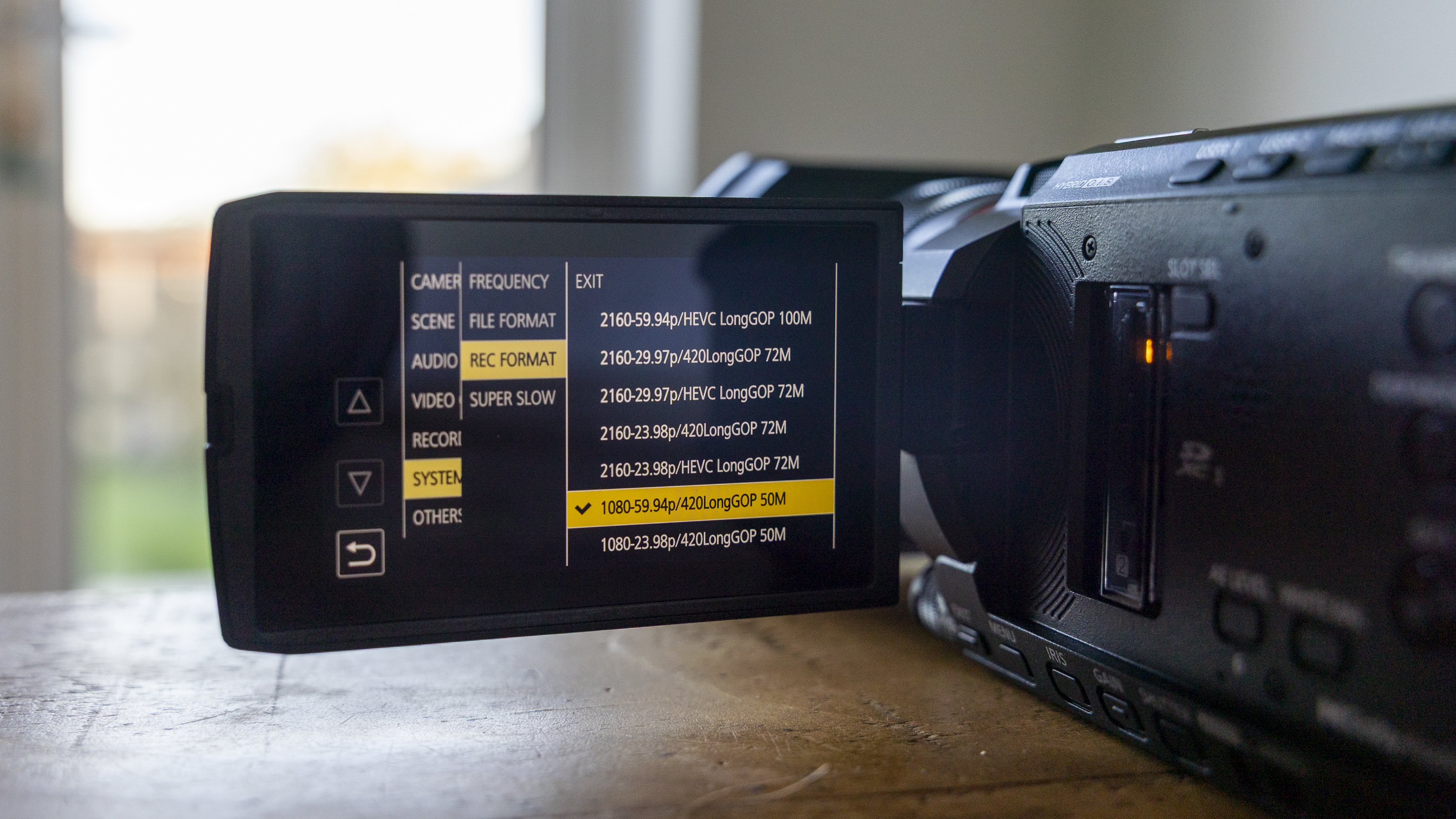
There are several video options to choose from, but only once you’ve stumbled upon the right place in the confusing, unintuitive menu. You can shoot in either UHD 4K or 1080p resolution, and two frequency modes (59.94 Hz for NTSC regions and 50.00 Hz for PAL regions) dictate the available frame rates, all at a maximum bitrate of 200Mbps.

Various encoding options will help those with more experience balance file size and quality, but if you’re new to moviemaking Panasonic doesn’t helpfully explain any of the options, so a bit of research might be needed in order to get the most from them.

Although it isn’t obvious, the HC-X1200 has the option for smooth slow-motion capture at up to 120fps, but only in HD (1920 x 1080). The idea is to help keep fast-moving subjects in focus, but while the results are definitely usable, the autofocus is the more limiting factor for ultra-fast and erratic subjects. In short, don’t buy this camera expecting to shoot a lot of crisp action.

The HC-X1200’s autofocus isn’t mind-blowing, and Panasonic doesn’t give a lot of detail regarding the mechanics of how it works. There’s nothing like the eye-detection precision of my Canon EOS R6 Mark II, but that’s to be expected at this price point.

Face tracking is easily turned on or off with a button on the body. It’s great for keeping you sharp during vlogging pieces to camera or documentary work, since the camcorder also adjusts the exposure automatically to keep the main face balanced in changing light. If you’re in shifting lighting conditions, this process takes a few seconds to recalibrate, but for interviews in a continuous or evenly lit room, it will cope well.

I was worried about low-light performance, due to the size of the camcorder’s sensor (1/2.5-inch) – usually a recipe for grainy, muddy footage. Out of the camera, the footage I shot at night was a little noisy, but far more usable than other camcorders I’ve tested with the same sensor size. The best results come from shooting at the camcorder’s highest bit rate, and then eking out the mileage with some creative grading.

If you work with dark footage rather than trying to brighten the shadows, the low-light footage is surprisingly usable. Setting the f/1.8 maximum aperture manually also helps. The HC-X1200 is also capable of capturing the invisible infrared spectrum for nighttime footage, but you need to buy an external infrared light source for this, so I didn’t test it.

With the dual SD card slots, you can set up two cards for relay recording (using one as an overflow when the first fills up), or simultaneous recording, so you have a backup. I only used one fast SD card when testing, but I often found the camera would be writing and processing footage for a long time after hitting the button to end recording. On a few random occasions, the camcorder froze, and I had to leave it alone for five minutes or so before, which isn’t ideal if you’ve got limited time with a subject or need to capture a particular moment.

On the plus side, it’s fully possible to record footage for as long as either your memory card(s) or the battery allows, since the heat-dissipating design genuinely delivers unlimited recording times, as Panasonic promises. I accidentally left the camcorder recording in my bag one day, and found I had several hours before the battery had run out.

Panasonic says you’ll get five hours of battery when recording 4K at 30p, and I got at least four and a half hours from one full charge, making this an excellent all-day companion if you have a few spare batteries in your arsenal.

Obviously, image quality is only half of the equation with video, and the HC-X1200’s audio quality falls somewhat short. If you’re a few steps from the camcorder, and ideally facing towards it in a wind or traffic-free zone, your voice is picked up clearly. Outside this ideal scenario – for example, if you’re walking and talking, or near a road – the built-in mic is less capable at picking out individual audio sources.

There are no clever AI algorithms working in the background to help suppress wind noise, as found on action cameras like the DJI Osmo Nano. So the onus is on you as the user to carefully choose the shooting location – in a sheltered spot away from the wind – or add an external mic with a furry wind shield using the 3.5mm jack input.

Should you buy the Panasonic HC-X1200?

Buy it if...

You mostly shoot in controlled or good lighting

The HC-X1200 isn't great at adapting to changing light in auto mode, and tends to get grainy in low light.

You don't need XLR inputs

There's a standard 3.5mm stereo mic input. You may need an external audio recorder for pro-grade quality.

Don't buy it if...

You want the flexibility of Wi-Fi

Without built-in Wi-Fi, you can't use a phone or tablet for remote control or livestreaming.

You like using an electronic viewfinder (EVF)

You've only got the LCD for changing settings and framing scenes. The screen is generous, but it can be hard to view in bright sunlight.

Also consider

A female photographer holding the Panasonic HC-X1200 in an autumnal scene

(Image credit: Future)

How I tested the Panasonic HC-X1200

  • I tested it for two weeks
  • I shot in full Manual and Auto mode
  • I used it for video, day and night

Panasonic loaned me the HC-X1200 for two weeks, and although it was raining almost the whole time (welcome to winter in the UK), I did take it with me on a few outdoor adventures, dog walks, and day trips, and I used it as an everyday companion for mainly handheld shooting.

I made direct comparisons with many other camcorders I've tested, as well as video on my now similarly-priced Canon EOS R6 DSLR and iPhone 15 Pro.

I shot videos using different iris settings and zoom lengths, in both fully automatic and manual modes, to compare the ease of use and quality of results from both.

  • First reviewed November 2025

Wednesday, November 26, 2025

HostGator Web Hosting review

HostGator is renowned as one of the best web hosting providers and has been helping customers get online since 2002.

These days the company is owned by Newfold Digital (previously Endurance International Group), the hosting giant who also runs Bluehost, iPage, Domain.com, and Network Solutions.

HostGator's cartoon mascot, cheerful website and low headline prices might leave you thinking it's mostly for consumers and hosting newbies, but in reality the service offers a full range of products for all levels of user.

What hosting plans does HostGator offer? 

HostGator's range starts with low-cost shared hosting, simple to manage, but with all the features many sites will ever need.

If you don't have a website already, HostGator's website builder helps you create a starting design in minutes. Editing can be as easy as typing in some text, and dragging and dropping images, contact forms and anything else you need onto the page.

More powerful VPS and dedicated products deliver extra speed and reliability, and are better suited for large or business-critical sites.

There's also a capable managed WordPress range, reseller hosting, domain registration and more.

Shared hosting

screenshot of HostGator shared hosting plan prices

(Image credit: Future)

When you sign up for a shared plan, HostGator places your website on a single server, which also hosts many other accounts. As everyone is using the same CPU, hard drive, and network connection, speeds aren't the best and can be more unreliable than VPS plans.

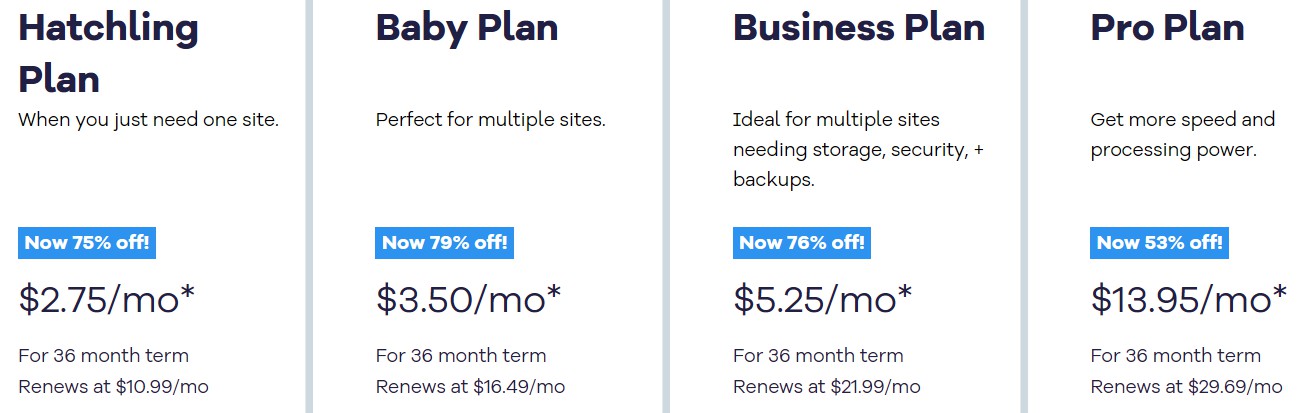
HostGator's shared hosting starts at just $2.75 a month over three years ($10.99 on renewal). It supports 10 sites, and provides everything we'd hope to see: free domain for the first year, 10 GB SSD storage, unmetered bandwidth, WordPress preinstalled, free SSL, the powerful cPanel control panel, and 24/7 support, all protected by a 30-day money-back guarantee.

Upgrading to the top-of-the-range plan gets you support for 50 websites, along with a Cloudflare CDN, two extra CPUs, daily website backups for one year, and domain privacy for one year. This plan renews at $21.99 a month, so in my opinion, it's not worth it when you get most of those features included in your plan with SiteGround for $17.99 a month.

Hostinger's shared hosting is an interesting HostGator alternative too. Its plans are priced similarly to HostGator's but you get a lot of paid for add-ons that are part of your plan at no extra cost.

Overall, HostGator's shared hosting is a capable product which has loads of features, but still remains very easy to use. It's just the higher level plans lack some value.

WordPress hosting

Screenshot of HostGator WordPress hosting plan prices

(Image credit: Future)

WordPress is a popular platform which can help you build anything from a simple single-page website, to a personal blog, a professional business site or (with help from add-ons like WooCommerce) a full-featured web store.

Other benefits are less visible, though also important. Managed WordPress servers are optimized for WordPress. They supposedly deliver more speed and higher security. The support team has more WordPress expertise and can help solve tricky WordPress-specific issues.

Despite these advantages, the managed WordPress plans are only a little more expensive, with prices starting at $3.50 a month over three years ($16.49 on renewal) for the basic plan.

This looks like a good deal to us, but after the first year, some features like email, domain, and CDN become paid-for addons, which increases the price. For managed hosting, SiteGround and Hostinger offer better value overall.

VPS hosting 

Screenshot of HostGator VPS hosting plan prices

(Image credit: Future)

VPS (Virtual Private Server) hosting, like shared hosting, has multiple accounts on the same server. But there aren't as many, and every VPS gets its own resources. If you buy a VPS with two CPU cores and 4GB RAM, for instance, no other account can use them, ensuring your site delivers higher and more consistent speeds. While shared hosting might run into trouble if you have tens of thousands of visitors a month, a good VPS can handle hundreds of thousands.

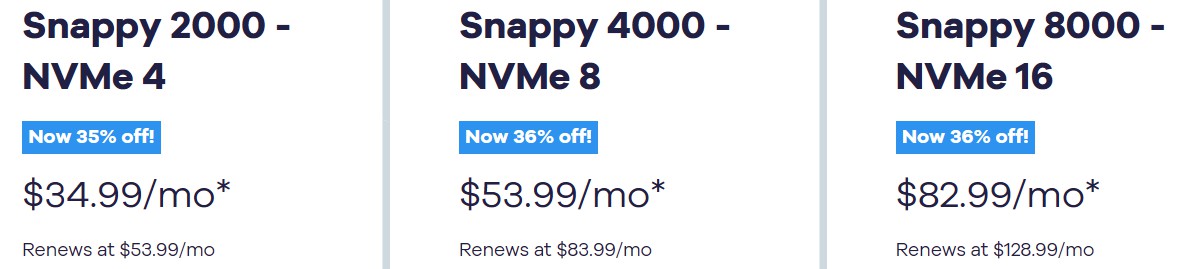
HostGator has only three VPS plans. The starter product gives you 4 GB DDR5 RAM, 2 CPU cores, 100GB NVMe storage, and 1 dedicated IP from $34.99 a month for 12 months, $53.99 on renewal.

The top-of-the-range plan offers 8 cores, 16 GB DDR5 RAM and 450 NVMe GB storage for $82.99 a month over 12 months, rising to $128.99 on renewal.

These are capable products, all fully managed (which means HostGator offers full support to keep the VPS updated and running smoothly), and should deliver solid and speedy hosting for larger, resource-hungry websites. But other providers typically have a far wider range of plans, and if you're looking for something cheaper, more powerful or configurable, it's well worth checking a few alternatives on the best VPS hosting guide.

It's worth noting that the 30-day money back guarantee does not cover plans purchased on the monthly basis. If you need a VPS for a quick spin then I suggest InMotion Hosting.

Dedicated hosting 

Screenshot of HostGator dedicated server hosting plan prices

(Image credit: Future)

Choose dedicated hosting and the server, the CPU, the RAM, the network connection is all yours, ensuring you'll never be affected by other site's behavior.

Another big plus for experienced users is the ability to set up the server just as you'd like. You can choose the hardware specs, the operating system, web server and more, and tweak them to suit your precise needs.

HostGator's dedicated server hosting products (like its VPS range) is limited, with only three server configurations.

These start with a 8-core, 32 GB DDR5 RAM and 1000 GB NVMe storage, priced at $141.19 a month over three years, $188.79 on renewal.

The top-of-the-range is an 32-core, 128 GB DDR5 RAM and 3000 GB NVMe storage for $312.19 a month over three years, $391.19 on renewal.

Both systems support Windows as well as Linux, a welcome option you won't see with most web hosts.

These are decent mid-range systems, fully managed with 24/7 support, and good value for what you're getting. But with three plans only, your choice is very limited. If you're looking for something outside of this middle ground, a cheaper or more powerful server, there are many more options available.

HostGator offers some valuable add-ons

Add-ons are something that most web hosts offer. It's an upsell attempt to try to get new users to pay more. It's also something I tend to ignore because of those reasons. However, HostGator is special and you may want to seriously consider some of their add-on services.

For example, you can get:

  • SiteLock for $2.99/mo. If you sign up for this security tool separately it'll cost you around $16.58/mo
  • Yoast Premium for $2.99/mo. This handy SEO plugin normally costs around $9.80/mo.

You don't have to sign up for these, but Yoast can be very useful for those who aren't familiar with SEO concepts. Although there's a free version of it available, Yoast Premium has much more guidance for new users.

Site migration: Be prepared for some DIY

One of the biggest pains I feel the most at HostGator is that they don't offer free website migrations. At many hosts, this is often part and parcel of their enticement to new customers.

Instead, HostGator wants you to pay them $149.99 to migrate your website from your previous host. Email migration is charged separately, at $99 per account.

Rather than pay these fees, I recommend you consider using a plugin for WordPress sites. UpdraftPlus (it's free!), for example, lets you export your WordPress site. You can then install the plugin on your HostGator account and import those files.

Does HostGator have a website builder?

HostGator control panel

(Image credit: HostGator)

Website builders are just about the easiest way to start a site. Choose from a selection of designs, drag and drop elements like text blocks, photos, maps and video onto the page, then customize the content to make it your own. Even newcomers could have a good-looking site online within hours.

All HostGator's shared hosting products include a free version of the Weebly site builder. This limits sites to six pages and displays a HostGator link in the footer, but it might work for kids or just learning what a website builder can do.

HostGator has a far better option in its stand-alone Gator Website Builder plan. Instead of asking you to choose a template, then drag and drop page blocks, Gator Builder asks you some questions and then automatically builds a site to suit your needs.

Prices start low at $3.84 a month over two years, $7.68 on renewal, which gets you hosting, a free domain, free SSL, the Gator Builder, and even support for a tiny three-product web store.

The top-of-the-range Gator Builder plan lifts the product limit, helps encourage customers with up to ten email campaigns a month, includes an appointment booking system and allows taking payments with no transaction fees. Those are some valuable e-commerce extras, yet it's still cheap at $9.22 a month over two years, $18.45 on renewal.

Put it all together and Gator Builder is well worth a look, especially for newcomers looking to take their first steps into the web design waters.

If you're looking for more features, try Wix. It's just as easy to get started, but gives you many more design and website tools, and you can try it out and build your first site for free.

GoDaddy's Website Builder also has a surprisingly capable free option (there's email marketing, an appointments system, even the ability to sell online with GoDaddy Payments), along with some business-friendly paid plans. And Bluehost's WordPress-based website builder has 300+ appealing templates, a custom image library and support for unlimited websites, but starts at only $2.95 a month.

Can I build a web store with HostGator?

HostGator doesn't have the same ecommerce-focused products as the likes of Bluehost and GoDaddy, but as we've discussed above, the Website Builder's Express Store plan is a simple solution for smaller web stores.

If you're looking for more power or features, then opting for a specialist WooCommerce hosting plan could make more sense (WooCommerce is one of the best ecommerce platforms around).

Bluehost's baseline WooCommerce plan includes tools to simplify building your site, take payments and collect customer reviews from only $7.45 a month on the annual plan ($18.99 on renewal). InMotion Hosting gives you even more choice, with optimized OpenCart and Magento software, bonus features and a pile of performance-boosting tweaks.

How fast is HostGator?

HostGator's GTmetrix grade

HostGator's GTmetrix grade (Image credit: GTmetrix)

We assess web host performance by signing up for a shared hosting package, using a standard WordPress template to create a basic site, then watching how it performs in different situations.

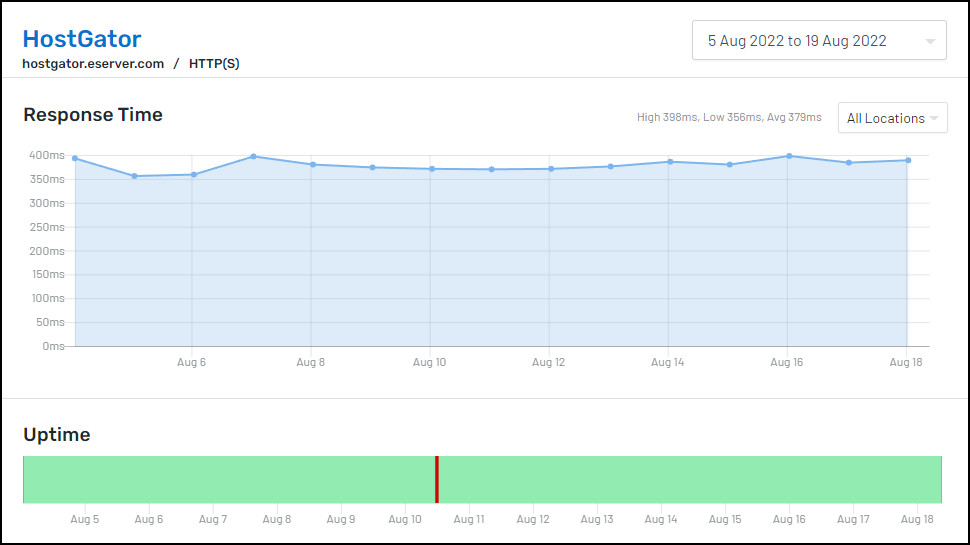
Uptime - the proportion of time a website is available to visitors - is a vital factor in hosting success. We test this by using Uptime.com to try to access our test site every five minutes over 14 days, and logging any failures. HostGator managed 99.63% uptime, and although that sounds like a high figure, it's a little disappointing for a short test (most providers manage 100%.)

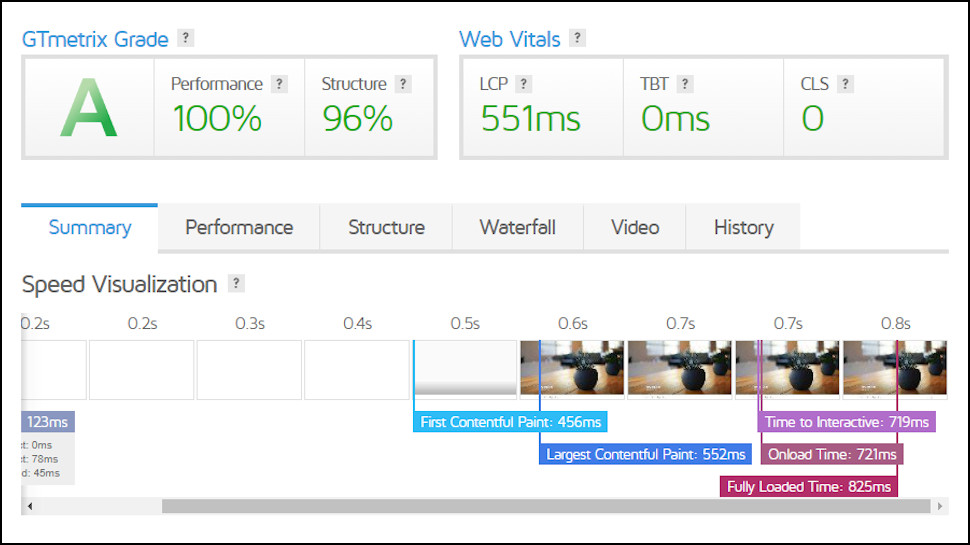
We measure website load speeds by using GTmetrix to access our test site, then calculate how long it takes to display the main content (a value known as Largest Contentful Paint, or LCP.) The lower a site's LCP, the faster and more responsive it feels.

This time HostGator trampled all over the competition, with an LCP of 0.551 seconds earning it first place out of our last 15 tests. The lead isn't huge - most providers score between 0.600 and 0.800 seconds - but this is an important stat, and a good result for HostGator.

HostGator's performance overview

(Image credit: HostGator)

We're also interested to see how a site performs when it's busy. The service k6 helps us figure this out by unleashing 20 simultaneous visitors on the site and monitoring what happens. This time the results were typical of most providers, with our HostGator site handling a very acceptable average of 15 requests per second.

WordPress benchmark testing

CPU & Memory

Operations with large text data

8.92

Random binary data operations

5.41

Recursive mathematical calculations

6.29

Iterative mathematical calculations

7.61

Filesystem

Filesystem write ability

9.18

Local file copy and access speed

9.56

Small file IO test

10

Database

Importing large amount of data to database

9.3

Simple queries on single table

10

Complex database queries on multiple tables

7.57

Object Cache

Persistent object cache enabled

0

Network

Network download speed test

10

Overall

Your server score

8.1

For each host we also perform a WordPress benchmark test. This enable us to get a bird's eye view of how the plan is able to handle core WordPress operations, such as file movement or database operations.

It's here that we find that HostGator offers some impressive scores, outperforming some distinguished brands like Bluehost. However, do note that these are snapshots, and not always indicative of real-world performance.

Siege test

Concurrent users

5

9

Transactions

2012

2322

Availability

96.55

96.19

Elapsed time

299.68

299.62

Data transactions

25.22

29.59

Response time

1.29

0.64

Transaction rate

6.71

7.75

Throughput

0.08

0.1

Concurrency

8.69

4.97

Successful transactions

2012

2322

Failed transactions

72

92

Longest transaction

20.37

11.86

Shortest transaction

0.03

0.03

The siege test is where things get more similar to real-world operations. During this test, we throw increasing numbers of virtual users at HostGator to see how it handles multiple simultaneous transactions.

What we observed was interesting. HostGator tries to process an impressive number of transactions, which was great. Unfortunately, it wasn't able to handle them flawlessly, resulting in some failing.

Overall, however, the failure rate was small (and unsurprising for shared hosting). It's still great performance, in any case.

How easy is HostGator to use?

HostGator's web account control panel

(Image credit: HostGator)

HostGator's customer portal has a helpful Create Website guide which walks hosting newcomers through their first site-building steps: installing WordPress, choosing another CMS or app, maybe uploading files via FTP. This doesn't do very much, but it's still a welcome touch which could be very handy if you're still finding your way around.

The rest of the portal is little more than lists of links. Click here to open the WordPress dashboard, there to create email accounts, and over there to manage your domains. There's even a Search box to find relevant support documents without opening a separate tab at the HostGator knowledgebase.

This is useful, but HostGator spoils the effect by regularly trying to sell you more stuff. At least eight of the control panel links were mostly about pushing other products. You'll quickly learn which links to avoid, but we don't think that should be necessary. If you've spent maybe hundreds of dollars on a hosting package, we expect its dashboard to focus on helping you use that, not selling you even more.

Fortunately, once you identify the useful links, they point you to some top-quality hosting tools. HostGator's shared hosting plans all come with cPanel, for instance, a very popular platform which has all the features you need to manage domains, emails, web space, databases and more.

Put aside the over-enthusiastic marketing, then, and HostGator is relatively straightforward to operate, even for newcomers to the hosting world.

How good is HostGator's support?

HostGator support page

(Image credit: HostGator)

Run into any issues at HostGator and its web knowledgebase could be the quickest route to an answer.

Searching for common hosting terms brings a huge number of hits, but that's partly because there are duplicates or not-so-relevant articles in the list.

When we searched for 'subdomain', the top result was an article called '[Featured] HostGator Datacenter Migration', for instance: not something we'd expect to come first. And the next three articles were titled 'What is a subdomain name and how to create one', 'Please read before creating a subdomain' and 'How to create a subdomain' (a blog post.) What we really want is a single comprehensive page, but here we'd probably open and read all three.

The various articles mostly have a lot of helpful content, and they can also be filtered according to their category. If you're only interested in cPanel guides, say, or video tutorials, you can view those results only with a click.

When you finally reach your chosen article, there's usually a lot of helpful content, but we found this wasn't always well maintained. The How To Create a Subdomain piece has broken image link icons where its screenshots used to be, for instance, making it less than useful as a tutorial.

If you can't find what you need, there's real live help available 24/7 via telephone, live chat and email.

Our experience with HostGator support has been excellent over the years, and it was broadly positive in this review. Email queries received speedy and accurate replies, and although we waited a lengthy 19 minutes to get a response on one live chat session, once the agent arrived he did a good job of identifying our fictional test problem and pointing us to the best and easiest solution.

Final verdict

HostGator has some of the best shared hosting plans around, speedy, great value, with a pile of features and responsive support on tap when you need it. Its high-end VPS and dedicated plans can't match the power of the best of the competition, but there's still a huge amount to like here for both home and big business users.

HostGator FAQs

Post-payment confirmation from HostGator

(Image credit: HostGator)

What payment types does HostGator accept?

HostGator accepts payment via card or PayPal.

Does HostGator offer refunds?

HostGator offers a 30-day money-back guarantee for shared, WordPress, VPS, and dedicated hosting plans. However, this only applies if you aren't on monthly plans.

There are other exclusions, but they're more typical. For example, domains, setup fees and third-party products and services aren't protected by the guarantee, much the same as we see with other providers.

HostGator's uptime score

HostGator's uptime score (Image credit: Uptime)

Does HostGator have an uptime guarantee?

HostGator's shared and reseller hosting servers have a 99.9% uptime guarantee, much the same as the rest of the shared hosting competition.

The company also says you could receive a credit of one month's fees if this target isn't hit. How might this work? The small print simply says if the service falls short of the 99.9% figure, you 'may' receive one month of credit. But you also may not, presumably. All you can do is talk to the Billing department and ask.

That's better than nothing, but we prefer a guarantee to spell out how this works. Scala Hosting, for instance, says you get 0% credit for downtime of 0.1% or less; 10% if downtime is up to 0.2%; 20% if downtime is up to 0.3%, and so on. The company still gets to define what 'downtime' means, but it's still doing a better job of defining your rights.

Dedicated servers are covered by a separate guarantee where you're credited depending on the amount of time your server is down, a simpler and more straightforward scheme.

Where are HostGator's data centers?

HostGator states that it hosts most websites at two main data centers in Provo, Utah, and Atlanta, Georgia, with 'some [servers] residing in other locations.'

In reality, you have many more choices in data center locations at sign-up. Aside from the US data centers, you can also select from Germany, Brazil, Spain, France, Australia, the UK, and India.

Where to find IP Address on HostGator

Where to find IP Address on HostGator (Image credit: HostGator)

What is my HostGator IP address?

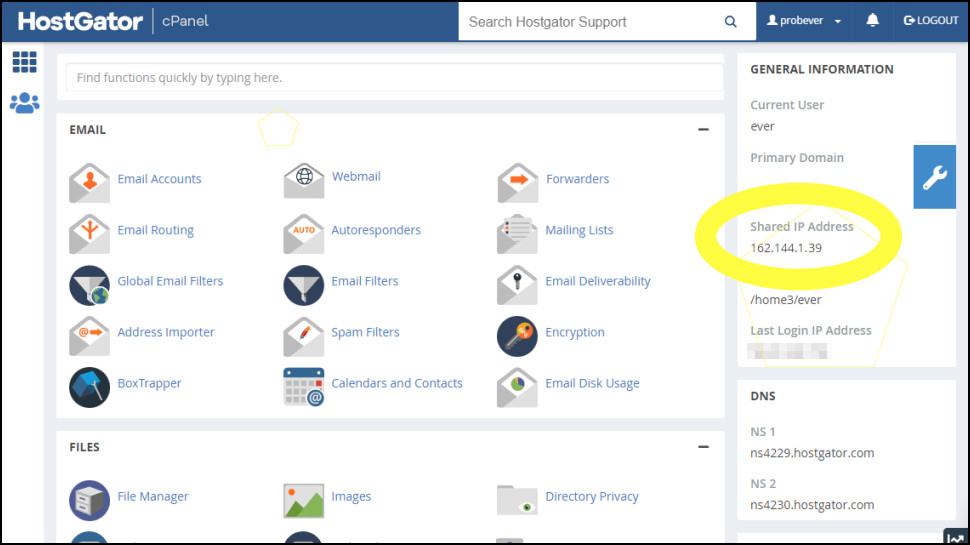
Sign into HostGator's customer portal (portal.hostgator.com).

Find your hosting package in the list, and click its Launch cPanel button.

The IP address for the server hosting your IP address is displayed as 'Shared IP Address' in the right-hand General Information box.

HostGator nameservers

(Image credit: HostGator)

What are HostGator's nameservers?

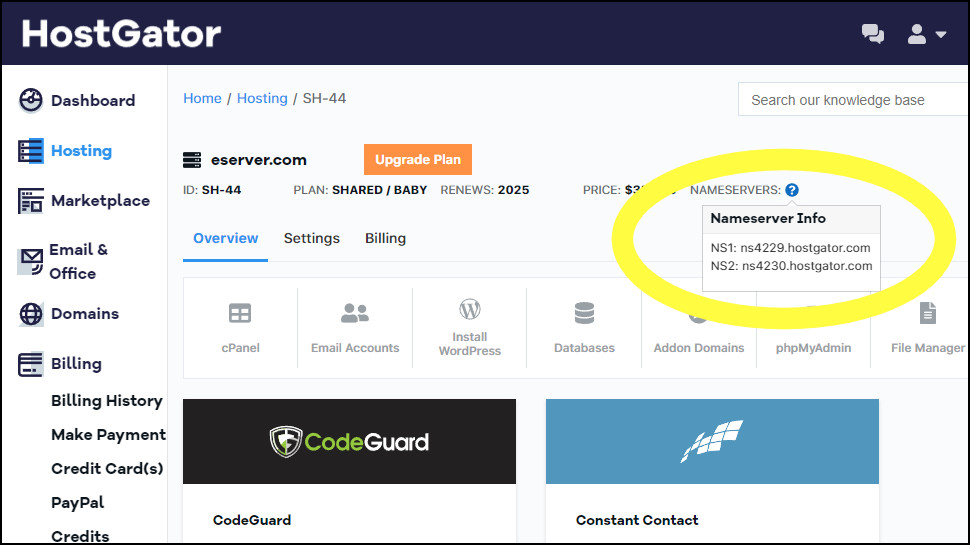
If your website domain isn't managed by HostGator, you may need to set it to use HostGator's nameservers to connect the domain to your new web space.

Unlike some providers, there aren't fixed values such as 'ns1.hostgator.com' and 'n2.hostgator.com' which you can use everywhere. The names you need, and how to find them, vary depending on your product and where it's hosted.

To find the details you need, log into HostGator's customer portal (portal.hostgator.com).

Click Hosting in the left-hand sidebar.

Click Manage for your website domain, then the Settings link.

Your nameservers are displayed in the 'Server Info & Settings' box.

How to cancel a product on HostGator

(Image credit: HostGator)

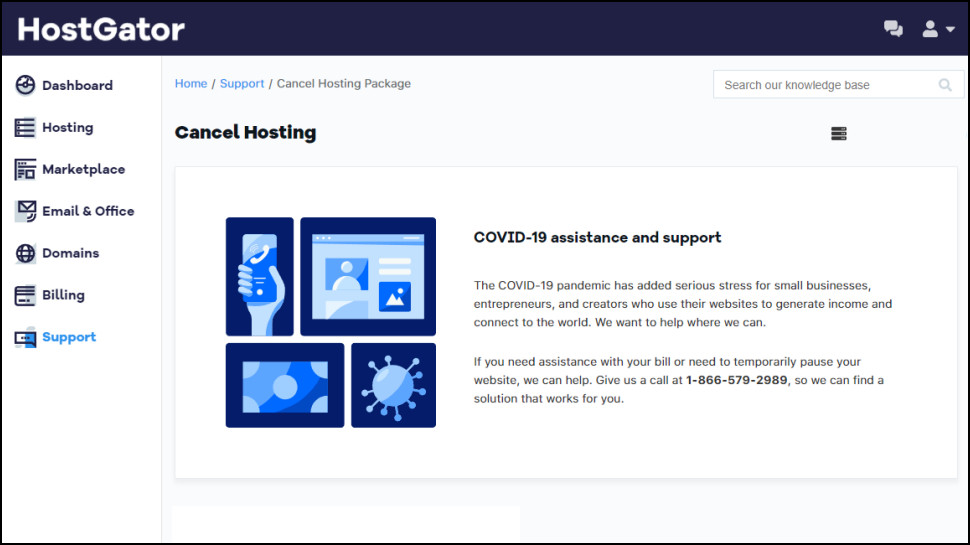
How do I cancel a HostGator product?

To cancel a HostGator product, first log into the company's portal (portal.hostgator.com.)

Find your hosting package in the list, and click Manage Package.

Click Billing, scroll down and click Cancel Package.

Read and follow the instructions carefully to cancel your HostGator plan.

Check out the latest Hostgator coupon codes to get discounts this month.

!!!!!!!!!!

Popular Posts

Categories

Blog Archive