UGreen NASync iDX6011 Pro NAS review: An AI-powered NAS combines workstation-class hardware with genuinely useful local AI

UGREEN NASync iDX6011 Pro: 30-second review
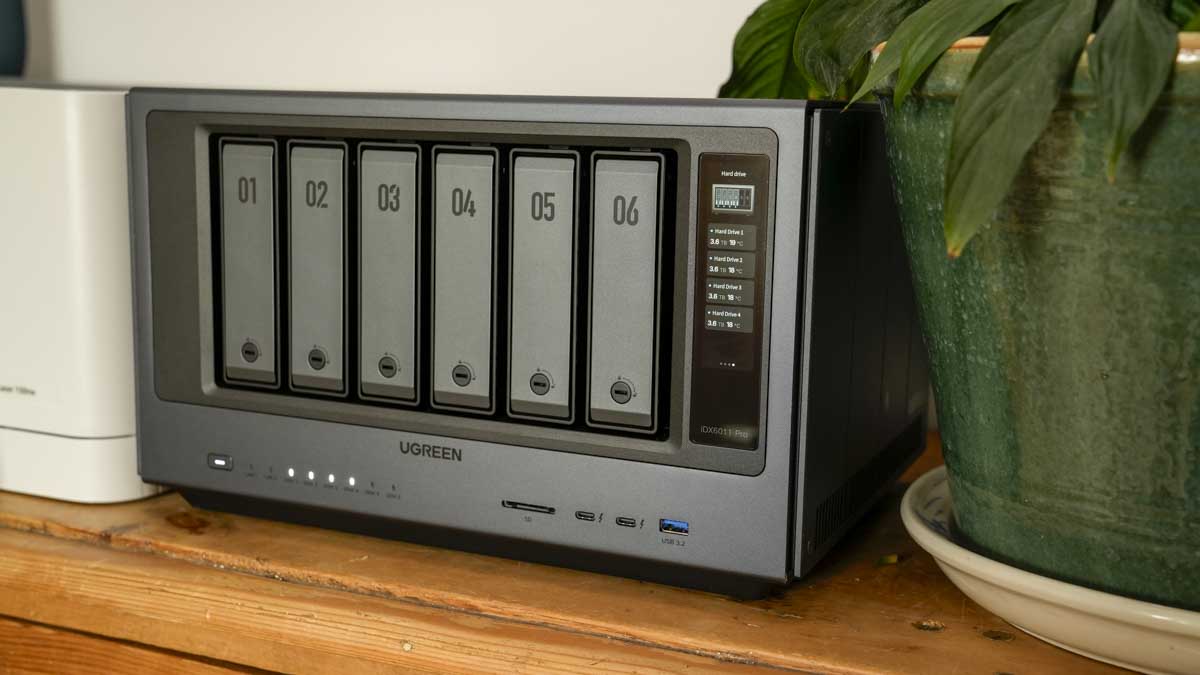
The UGreen NASync iDX6011 Pro is substantial, measuring in at 349 x 260 x 212mm, it sits closer to an ITX PC case than anything you would ordinarily describe as a NAS, and lifting it out of the packaging highlights that this is a serious piece of kit that’s impressive design makes you want to keep it out on show rather than hidden away.
Once positioned in a prominent place in the office, the matte grey aluminium chassis and rounded edges give it a premium, stylish look that departs from the larger rack-mount aesthetics of more industrial NAS hardware. The design and aesthetics are perfect for any design or photo Studio space.
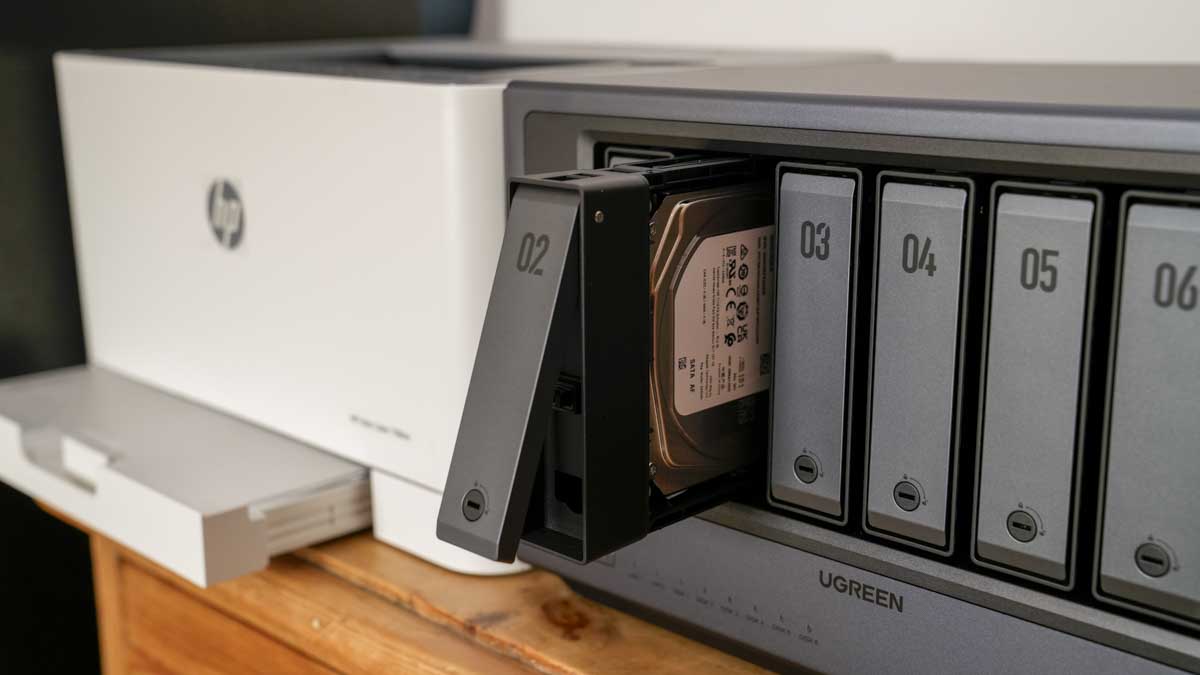
Getting started with the iDX6011 is as straightforward as the other UGreen NAS systems that I’ve looked at. Essentially, each of the six front bays is secured by a flathead key lock, which once pressed, releases so the tray can slide out. You then drop in a 3.5-inch hard drive all without the need for a single screw, then slide it back, and lock. The whole process takes under 30 seconds per drive.
For this review, I installed four 4TB Western Digital drives, configured in RAID 5 via the guided UGOS Pro setup, for a total of 12TB of usable storage, with one drive's capacity matched to the RAID 5 configuration. I used the two M.2 NVMe slots for caching and installed two 1TB sticks.
On the front of the machine is a small vertical 3.7-inch touch LCD that lets you flick through a few stats and information from the system. This is genuinely helpful and interesting, especially as you start to delve into the local AI to monitor resource usage.
One of the uses of this screen came into play during the initial setup, where I was able to quickly see the NAS IP address. It’s only a small thing, but genuinely helpful. The screen also provides a quick glance at CPU, GPU, NPU, RAM, storage, and network load without opening a browser.
Through the initial part of the test, I put the standard NAS functions to the test, and setting up storage for local and shared use worked well. I especially liked that I could use it as a local Dropbox to share files with clients without paying for an external service. I was also able to set up a local media server, although apps such as Plex aren’t currently in the main library, so you can either use JellyFin or Theatre, or use Docker or SSH through the terminal to install and set up.
This is where this machine comes into its own. Through UGOS, it has given you plenty to get started, but if you want more, it seems to support an incredible amount of customisation.
The main focus is on the local LLM options. By default, you have UIiya, which provides a chat interface you can use to perform basic tasks, such as finding documents and photos. What stands out here is that it runs locally with no online connection needed.
As I delved deeper into using AI on the system, I soon ran into limitations with the onboard AI. It’s good, but not as involved as I wanted. However, connecting to the ChatGPT API and to the paid cloud service enhanced the AI tool set to the point that it wasn’t just useful, but could sort through and catalogue a huge volume of images and videos. This not just makes it useful, but completely invaluable, ploughing through mundane tasks at a relatively fast pace.
The AI potential, alongside the standard NAS options, instantly makes this a valuable asset to any studio or business working with multiple files that need to be organised. It enables human commands and a little AI connection to go well beyond any machine I have used to date.
UGREEN NASync iDX6011 Pro Price & availability
- How much does it cost? $1559
- When is it out? Now
- Where can you get it? Available May
The UGreen NASync iDX6011 Pro is currently available on Kickstarter here and on the UGreen website where it had an early-bird price of $1,559. The pre-order deposit page here has, unfortunately, sold out. The standard retail pricing has not yet been confirmed.
Shipping for the iDX6011 begins May 2026 and will launch with a three-year warranty and five years of security updates. It’s also worth considering that the drives are sold separately.
- Value: 5 / 5
UGREEN NASync iDX6011 Pro: Design
CPU: Intel Core Ultra 7 255H
AI compute: 96 TOPS
RAM: 64GB LPDDR5X
System SSD: 128GB
Drive bays: 6x SATA HDD/SSD bays up to 196TB
M.2 slots: 2x M.2 NVMe
Expansion: PCIe Gen4 x8 slot, OCuLink port
Networking: Dual 10GbE LAN
Ports: 2x Thunderbolt 4 (40Gbps), USB 3.2 Gen 2 (10Gbps), SD 4.0 card reader
Display output: HDMI 8K
Front display: 3.7-inch touch LCD
RAID support: RAID 0, 1, 5, 6, 10, JBOD, Basic
OS: UGOS Pro
AI platform: Uliya (on-device LLM), supports Llama, Mirai, DeepSeek, Qwen; cloud API via OpenAI / Claude
Dimensions: 349 x 260 x 212mm
The iDX6011 Pro is a relatively large NAS unit that requires a good amount of space, not only for the NAS itself but also to enable plenty of airflow around the back. If you have limited space, then the size and, for that matter, weight might well be an issue.
If you’re considering putting it on a shelf, the 10kg weight of my review unit loaded with four drives might give you an idea of the scale, and at 35 x 26 x 21.5cm, you’ll need some pretty substantial shelving to take the load.
Size aside, this is a stunning-looking piece of kit, so a prominent spot, if only for purely aesthetic reasons, is well worth it. Once positioned, its matte grey aluminium chassis, rounded edges, and numbered front panel with that vertical touch screen all add to the unique look, far removed from the usual utilitarian look of traditional high-capacity NAS hardware.
The six front drive bays across the front are numbered, and in this review, I filled four of them with 4TB WD Red drives, which are an additional purchase. Each drive tray is secured in place with a push-release mechanism, secured by a flathead key lock, making the drive trays completely tool-free. Getting a drive in and out takes under 30 seconds, and the mechanism feels solid.
Alongside the drive bays and the screen, the front also features two Thunderbolt 4 ports, a USB-A and an SD card reader.
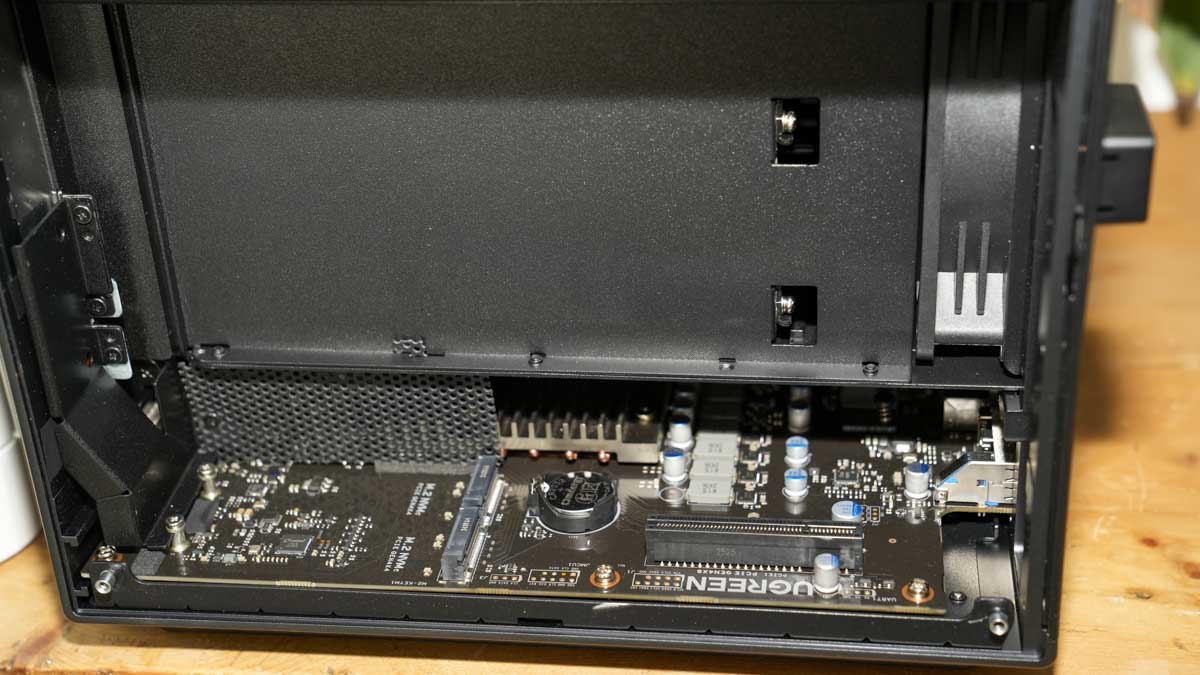
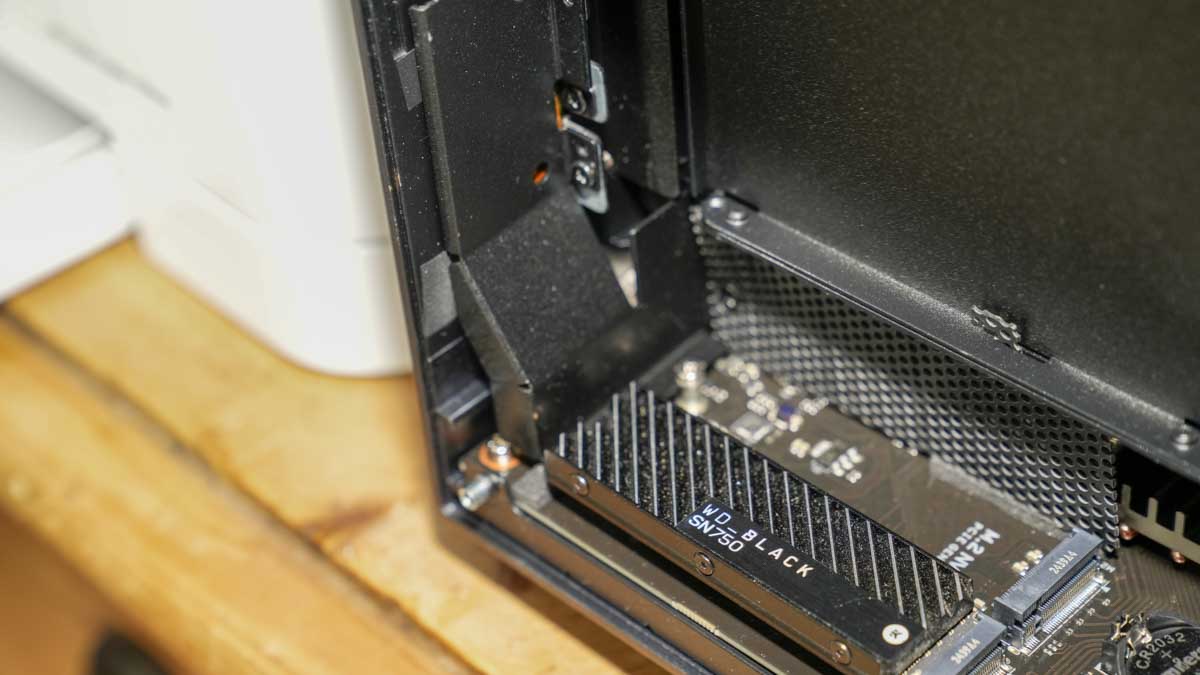
The SATA SSDs do require screws, and the M.2 NVMe slots require heatsinks, while the SSDs aren't supplied, everything else is. The NVMe slots are accessible via the right side panel, which uses a hex-key fastener; a driver is included.
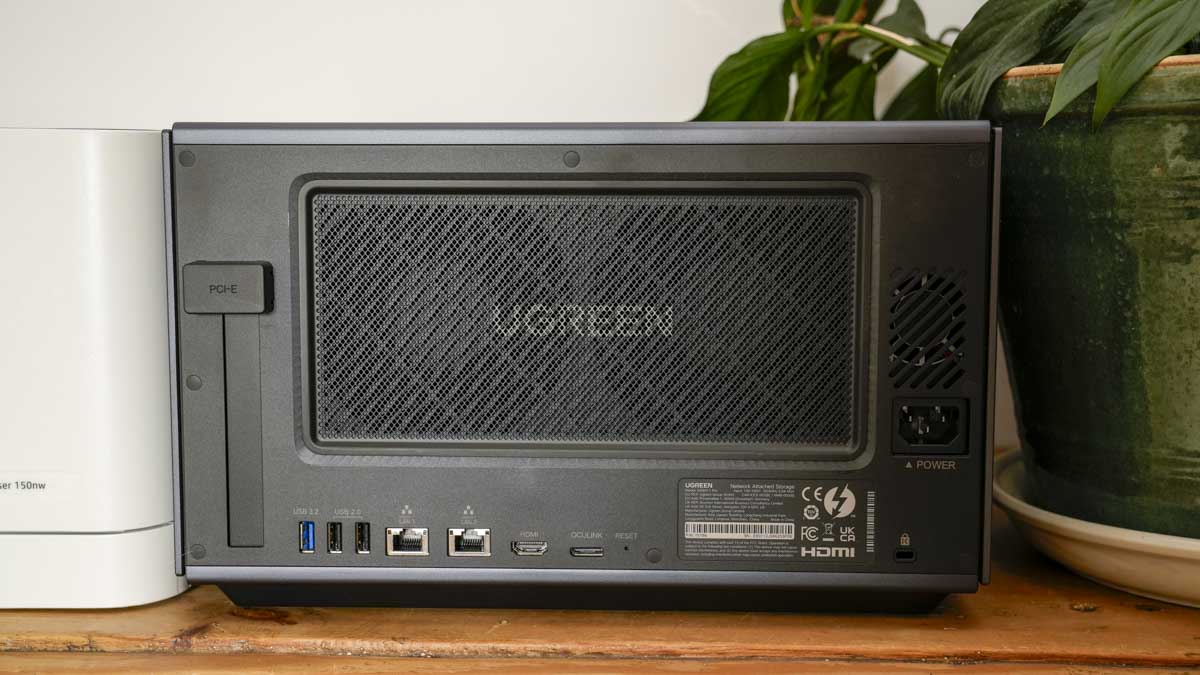
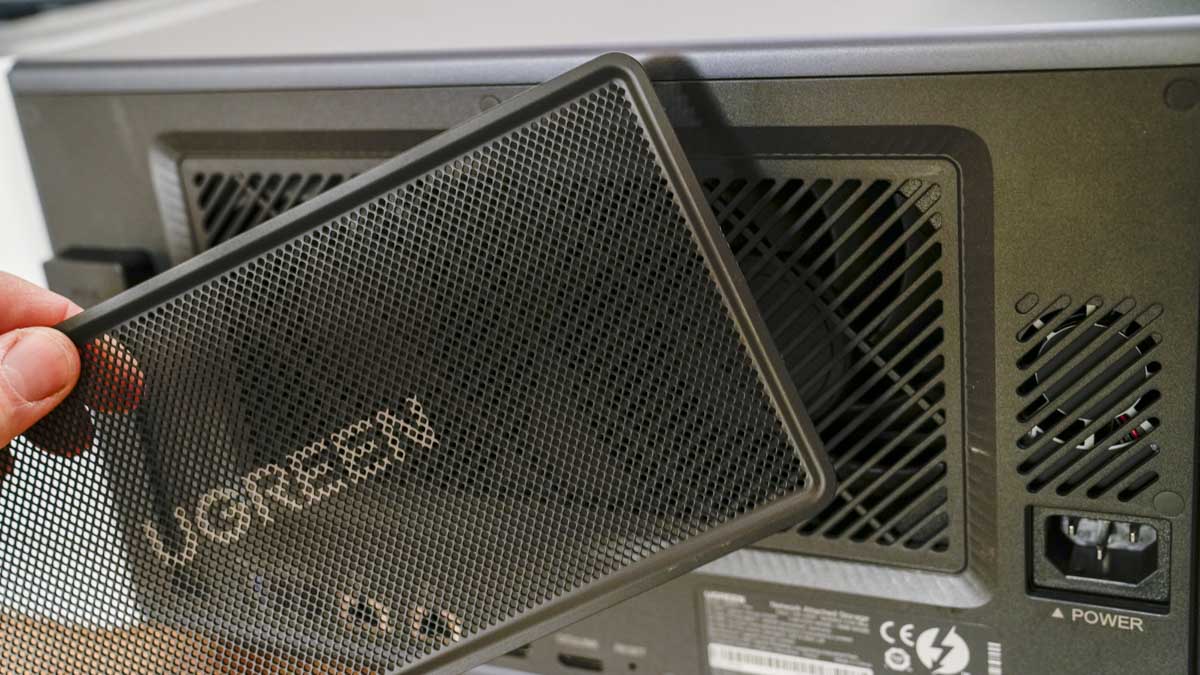
The rear of the machine includes three USB-A ports (one 3.2 and two 2.0), dual 10GbE LAN, HDMI 8K, OCuLink, PCIe Gen4 x8, and the power input. The back also features a magnetic dust mesh filter that covers the main fan grille. This simply pulls free to clean when needed, and it's a feature I’m increasingly seeing on NAS systems. Essentially, for a device expected to run 24/7 in a studio environment, keeping dust under control is crucial, so anything that makes cleaning easier is definitely welcome.
One issue with many NAS systems is noise; however, here it is well controlled by a hydraulic rear fan that runs at 29–34 dB. During testing, including sustained transfers and AI processing tasks, the machine remained noticeably quieter than most NAS units at this capacity.
There is of course, the usual hard drive activity sounds, clicks and soft whirs as drives spin up and seek data, but the overall noise is more than acceptable for open studio use.
- Design: 4 / 5
UGREEN NASync iDX6011 Pro: Features
The hardware specification of the iDX6011 Pro reads more like a mini PC than a NAS. The Intel Core Ultra 7 255H brings 16 cores, 16 threads, a 5.1GHz boost clock, and 96 TOPS of combined AI compute from the CPU, integrated Arc GPU, and NPU.
That processing power is paired with 64GB of LPDDR5X RAM, soldered and non-upgradeable, though 64GB is more than sufficient for any workload this machine is realistically expected to run. Through the test, it proved capable of handling multiple simultaneous large-file transfers, AI indexing, transcription, and network file serving without significant slowdown.
As a six SATA bay NAS there’s plenty of flexibility when it comes to how you configure the storage capacity, in this review I filled four of the six bays, but maxed out this system will support hard drives or SSDs up to a theoretical 196TB, that includes two M.2 NVMe slots that are able to add fast caching or dedicated SSD volumes.
On top of the removable storage, there's also a separate 128GB system SSD used for the UGOS Pro, Uliya, and system apps, which are kept separate from user data. When it comes to how you configure the installed storage, you can choose RAID 0, 1, 5, 6, or 10, and the system guides you through the initial configuration.
Through the bulk of the test, I had the NAS connected to the wired network, which enabled fast transfer over the dual 10GbE networking ports. I also tested the system over the wireless network to check for any compatibility issues.
What I noted during the test was consistent speed throughout, with fast transfers, and the dual Thunderbolt 4 ports that can provide a theoretical transfer rate of 40Gbps, which also proved handy for direct-attached transfers from portable SSDs and Memory cards.
Roughly 10GB of data transferred via Thunderbolt 4 in around 10 minutes for 572 files, averaging approximately 300MB/s. This made offloading a shoot's worth of CFexpress cards to storage a relatively quick option and enabled me to access and share the contents easily without needing to rely on a paid-for service. This alone makes this a valuable investment, with the cost of my WeTransfer subscription topping over £200 a year.
The traditional NAS functions and features are well integrated, and the UGOS is slowly developing into a solid platform. However, it’s the AI platform centred around Uliya, UGREEN's own on-device assistant, that really starts to make this NAS interesting and something totally different to anything else on the market.
Out of the box, it runs UGREEN's own lightweight language model, and additional models, Llama 3.1 8B, Mirai 7B, DeepSeek 7B/8B, can be installed through the AI Console app or via Terminal, which through the use of the NAS I came to rely on to get the most out of the system and not just for the AI features.
The full use of some features or models did require Terminal setup and cloud API keys for the Cloud-enabled features; however, these were all relatively easy to sort out. Support for connecting to cloud APIs, such as OpenAI GPT-4/5 and Claude, is available through a paid API key.
Once connected, you get away from the unique offline AI feature, and the full potential of this machine starts to unlock. The difference between available offline/local and cloud-dependent functions is significant, and I’ll go into this more in the AI and Performance sections.
One of the biggest features of the offline AI abilities is the Voice Memos feature. This isn’t installed by default and needs to be installed from the App section. The Voice Memos app, along with the relevant transcription model, enables on-device audio transcription, summarisation, and mind-mapping.
To test this out, I loaded a 17-minute, 22-second audio file, which was transcribed locally in approximately 2 minutes, with speaker identification, a summary, and a mind map generated without the file leaving the machine or utilising any online service. If you have any type of interview- or meeting-heavy work, client review transcription, or meeting minutes, this feature makes this box incredibly valuable again.
AI is the big feature of the iDX6011 Pro, and it works on several levels that you can get started with right out of the box. Essentially, this NAS has been designed with privacy-first features for the AI assistant, meaning that it’s 100% local to the machine and doesn’t rely on any type of connection to a cloud service.
This means that if you have it on an isolated network, you’re still able to use the AI features to help you organise files, recognise photos, and conduct searches of your drive's content using natural language. You can also use the chatbot to help answer questions about your data.
In practice, some features run locally, and the Uylia does contain an impressive amount of information, even if the knowledge is limited to a cut-off date in June 2024. While most AI features are directly available in the UGOS, others require a Terminal window to get the full experience, and if you want the really advanced interaction, then a paid cloud API is required.
Through the test, I found a huge number of the features worked well locally. Uliya's chat function is a decent offline assistant for general questions. Through the test, it answered photography technique questions with surprising accuracy, generated formatted spreadsheet templates that could be copied into Excel or Google Sheets, and provided useful reference information at a speed that, whilst slower than a cloud equivalent, was still.
For a general-purpose knowledge tool running entirely on-device, it is honestly impressive at its weight class.
Voice transcription, once downloaded and installed, proved to be one of the most impressive features, processing a 17-minute audio file to produce a full transcript with speaker identification, a summary, and a mind map. Essentially, if you have any workflow that involves client interviews, meeting recordings, or video content requiring transcripts, this feature is instantly of interest and requires no API, no subscription, and no data leaving the building.
Photo recognition and file organisation are where the gap between what I expected and what was possible was most apparent. The photo indexing works, but requires re-indexing after new uploads to reliably recognise content, and even then, I found it a little hit-and-miss.
Training the model on specific individuals by adding five to ten sample images of a person improves face recognition to a usable standard. Semantic search for documents worked well for labelled files, but was less effective at finding content within documents.
However, these basic features are already covered by other NAS systems, and I was really looking for something altogether more ambitious. Essentially, sorting out years of image files into an organised filing system. This would require physically moving and sorting thousands of files into date-and-subject folders, processing an entire drive's image library with accurate recognition, and generating contact sheets.
To do this, I needed more power than the onboard language model could provide, so I connected to a cloud API via a Terminal SSH session. Once GPT-5 was connected via the OpenAI API, the machine became a genuinely impressive combination of fast local hardware and cloud intelligence, able to sort, tag, rename, and organise files at a scale and speed that were not achievable with Uliya alone.
There is an issue with this workflow; it requires familiarity with SSH, careful pre-planning of exactly what you want the system to do, and ongoing API costs, which get away from the out-of-the-box solution. But knowing it’s there and usable adds another level to this box.
- Features: 4 / 5
UGREEN NASync iDX6011 Pro: Performance
As a pure NAS, the iDX6011 Pro performs incredibly well and offers everything you would expect, including storage and apps. In my review sample, I installed four 4TB Western Digital drives in RAID 5 configuration and dual M.2 NVMe SSDs configured as cache, then connected the machine to the wired network and made it accessible through the Wi-Fi router.
Connection speeds on both connections were fast and essentially stable, and through the UGOS, you can easily monitor activity as files cross from one device to another.
The ease of use of the NAS is apparent from the outset: the drives slot into place tool-free, and once powered on, the UGOS guides you through the RAID setup.
Essentially, after inserting the drives and powering on, a QR code on the touch display opens the browser setup, which then guides you through drive detection, RAID selection, and storage pool creation in an easy-to-understand sequence.
For this test, I opted for RAID 5, which gave 12TB of usable capacity from the 16TB of drives installed. I also added two M.2 SSDs as cache, which were allocated via the UGOS Storage Centre. Using SSDs as cache noticeably improves small-file transfer performance, and since I’m using this for website code and images, allocating space on the SSDs for caching makes sense.
The UGOS Pro operating system is well-designed, and having used it in the past, it’s good to see it evolving and becoming increasingly polished. Although the pre-production software I was using had a few stability issues during the review, most were easily fixed.
An example is the Universal Search feature, which disappeared from the desktop app after one update, although it remained available through the browser login. Then Uliya, the AI chatbot, stopped responding altogether after a Terminal session that involved installing and uninstalling multiple language models in succession. Reinstalling the Uylia model seemed to fix the issue.
Quite often if there was an issue, almost always after an SSH session, a full reboot resolved the problem. It’s also worth noting that these problems occurred in an environment where the system was being pushed much harder than most users would. For most standard NAS use, file serving, backup, and media streaming, as was carried out during the later stages of the test, the NAS provided solid performance.
One of the features that I initially thought was more of a gimmick than anything was the front touch display; however, it provides a useful real-time performance view. Watching CPU, NPU, and RAM utilisation during AI transcription and file transfer just gives you feedback on how the hardware is working through the tasks. The display also came in handy during setup, showing the device's IP address without requiring access to the router's admin panel.
Cooling for the NAS seemed well controlled, and while you can hear the fans kick in under sustained load and with AI processing, the machine ran warm but never too hot. The fan noise increased slightly during intensive AI tasks, but it was never overly distracting.
In the initial part of the test, I used the NAS as a straight-out-of-the-box solution, ran the setup, and allocated storage, both local and shared. I then offloaded a CFexpress Type B card from a studio shoot using the Thunderbolt 4 port on the front, and this was all easy enough.
Using the UGOS interface to make the transfer from the CFExpress to the NAS. I then set the new folder to be shared and was able to send it to a colleague for review without using a third-party service such as WeTransfer.
I then copied additional material from a portable SSD, and again the transfers averaged around 300MB/s for a mixed file set of 572 items across approximately 10GB. This was fast enough that backing up a full shoot's card set and moving footage to a working drive felt relatively quick, if not as fast as a direct-attached drive.
What I liked about all stages of using the iDX6011 Pro is that the UGOS Pro operating system offers an easy-to-use user interface, and this ease of use is apparent from the outset.
Through the UGOS, I was then able to use the onboard AI, Uylia, to check the files and the contents of other data I had copied to the NAS. Even after connecting the image files to the Photos App and ensuring everything was properly indexed, the quality of the AI search and file integration through the chatbot was slightly limited. Essentially, it felt more like a chatbot than a true AI assistant at this level.
That said, there are tasks that are genuinely useful, and as I trained the photo model to recognise vehicles, places, and people, it did become progressively more useful. This is a feature that feels like it is still developing, and tighter integration is still required.
Where the onboard AI really comes into its own is with the voice memo app, which can transcribe audio. This worked completely offline and proved to be incredibly accurate and detailed. Not only does it transcribe, but it can also summarise. The initial transcription is quick: 17 minutes of audio takes around 2 minutes to transcribe, while the summaries and mind maps take a bit longer.
The onboard AI is genuinely useful, but still feels limited in its approach and application. However, the potential really comes through when you connect to a cloud model. This does require an API and incurs costs, but the potential is huge.
Once I had connected, I created a “To Process” folder on the NAS, and then a “Photo-Processed” and “Videos-Processed folder”. I then dropped in several GB of images into the “To Process” folder, and the NAS scanned the entire folder of nearly 10,000 images, organised them by date and a descriptor, and provided a contact sheet for each.
To get this to work, I first set up the API, which was straightforward using ChatGPT, then connected via SSH in Terminal on the Mac and gave the machine commands to do exactly what I wanted. This wasn’t a straightforward process, and there was quite a bit of back and forth with the commands, but eventually it worked and with great effect.
This really highlighted just how powerful this machine could be with the right level of skill.
What’s more, the LLMs that I was using were relatively small due to the resources available. However, with an eGPU connected via the OCuLink port, the potential of this processing will open up even further.
As a standalone six-bay NAS, the iDX6011 Pro is an impressive piece of kit, but once you start incorporating the Ai, both offline and online, the potential of this NAS is huge.
- Performance: 4.5 / 5
UGREEN NASync iDX6011 Pro: Final verdict
The UGreen NASync iDX6011 Pro is a major advancement for this level of NAS, and at the price is just about affordable for small to medium-sized businesses and studios. The hardware is impressive, and I haven’t seen anything anywhere near as powerful in a NAS before. The fact that it features a Core Ultra 7, 64GB of RAM, dual 10GbE, dual Thunderbolt 4, six drive bays, and on-device AI is impressive at every level.
If you’re a creative professional or small studio that needs fast, private, high-capacity storage with the processing power to do more than just hold files, this machine is exceptional, with loads of as-yet untapped potential.
The integrated AI is useful in some areas, such as voice transcription, document summarisation, and general knowledge queries, and the fact that it runs offline is also impressive and can be useful depending on your business.
For more advanced automation and file organisation, I found I needed to connect to a more powerful cloud API’s, and to do so, some familiarity with SSH is required, which is quite technical.
That may change as UGOS Pro advances, and the fact that it already has some automated feature Apps, such as image recognition and voice transcription, means there’s plenty of scope for the future.
If you’re a photographer or videographer who wants fast local storage, offline AI transcription, and the option to connect to more powerful AI models, the iDX6011 Pro is a great option. For anyone expecting a plug-and-play AI assistant out of the box, it’s good but nowhere near as fast or as good as some online models.
Should I buy a UGREEN NASync iDX6011 Pro?
|
Value |
Workstation hardware at a NAS price, great value for the specification, worth highlighting that AI features are still developing. |
4.5 |
|
Design |
aluminium case, excellent build quality, touch display, and dust filter all add to a stunning design |
5 |
|
Features |
Dual 10GbE, dual Thunderbolt 4, six bays, OCuLink, PCIe expansion, voice transcription, and a local LLM, a unique feature set. |
4.5 |
|
Performance |
Fast transfers, capable AI processing offline, and a RAID setup process that any level of user is able to navigate. |
4.5 |
|
Overall |
A unique NAS with an AI platform that works offline and has huge potential as the platform develops |
4.5 |
Buy it if...
You need fast storage with AI potential.
Fast transfers, private local storage, and impressive offline voice transcription make this a great choice for photographers and videographers .
You are comfortable with Terminal.
If SSH sessions and cloud API setup don't faze you, the iDX6011 Pro has an incredible amount of potential.
Don't buy it if...
You expect an out-of-the-box AI
The AI chat interface isn't the autonomous file manager it promises yet; Terminal and a cloud API are still needed for the best results.
Kickstarter risk concerns you.
The hardware feels finished; however, I sense the software is still developing. At $1,559 on Kickstarter, that is a huge initial commitment.
For more storage solutions, we've tested the best NAS devices.

0 comments:
Post a Comment