InMotion Hosting review

What types of hosting does InMotion Hosting offer?
InMotion Hosting offers everything from shared hosting for the most basic needs to dedicated servers.
Its managed WordPress hosting supports running anything from simple family blogs to heavy-duty business sites, while hosted WooCommerce and Prestashop plans can help you build a professional web store.
If it's raw server power you're after, VPS (Virtual Private Server), dedicated and cloud hosting plans cover everyone from expert personal users to international corporations.
Starting at the 8GB and higher plans, all VPS servers are using Gen 4 NVMe SSDs which can be 6x faster than SATA SSDs and up to 20x faster than traditional spinning drives.
There's a lot to consider, but next we'll look at some of these hosting types, find out what they offer, what they don't, and whether they could be a good choice for you.
Shared hosting
Shared hosting is a system where your website and many others are stored on the same web server. Sharing both resources and costs means shared hosting can be slow, but it's also very cheap, and can be a good choice for smaller sites.
InMotion Hosting's shared hosting starts with its Core plan (from $3.19/mo for first-time buyers on a 3-year term). This includes a free domain, supports one website, provides 100GB of SSD storage, and offers unlimited bandwidth. The plan only comes with 10 email addresses (most accounts have no limit). There's also free SSL, malware protection, and 1-click WordPress installation, while the excellent cPanel has everything you'll need to manage your site.
The Launch Plan only supports 2 websites, but the Power and Pro plans scale this up with 10 and 40 respectively. They handle as many email addresses as you need, and have some unusual speedup features, including ultra-fast NVMe storage, for instance, something we rarely see with shared hosting.
Unsure about signing up for long-term contracts? Us too, but InMotion Hosting offers more protection than most with a 90-day money-back guarantee (three times the industry standard 30 days), for all of its shared and WordPress hosting plans, plenty of time to be sure if this is the right package for you.
|
Plan |
Starting price |
Renewal price |
|---|---|---|
|
Core |
$3.19 |
$10.99 |
|
Launch |
$4.99 |
$13.99 |
|
Power |
$4.99 |
$17.99 |
|
Pro |
$10.99 |
$24.99 |

WordPress hosting
WordPress is the world's favorite website creator, a one-stop tool which can build anything from simple personal sites to busy web stores and the most heavy-duty business-critical projects.
InMotion Hosting's shared plans have an automatic WordPress installer, good news if you're just looking to learn the basics. But its specialist WordPress hosting range goes further, with server-level speed optimisations, extra security to keep hackers at bay, automatic WordPress updates and more.
Prices start at only $3.69 a month over three years ($11.49 on renewal) for the WP Core plan. It's limited to one website and ten email addresses, but InMotion Hosting suggests a WP Core site could handle 20k visitors a month, more than enough for many users.
The $ 5.49-a-month WP Launch plan lets you host one more website (for a total of two) and provides enough resources to support 50k visitors a month, making it our budget pick.
These are capable plans, reasonably priced, with the power to handle (at the top of the VPS range) perhaps a million visitors a month. But the WordPress-specific features are much the same as you'll find with other providers. If you're after real WordPress power, WP Engine offers genuinely Premium themes, intelligent updating, smart performance optimizations, page speed testing, and more.
InMotion Hosting also offers what it calls UltraStack ONE for WordPress. These are special plans built on their VPS platform, albeit fine-tuned for mission-critical WordPress sites. These start at $33.33/mo (same price on renewal) if you sign up for a one-year term. UltraStack ONE plans come with a minimum of 8 vCPU and 8GB RAM, alongside NVMe storage, W3 Total Cache, Redis cache, and a 99.99% uptime SLA.
|
Plan |
Starting price |
Renewal price |
|---|---|---|
|
WP Core |
$3.69 |
$11.49 |
|
WP Launch |
$5.49 |
$14.49 |
|
WP Power |
$5.49 |
$18.49 |
|
WP Pro |
$11.49 |
$25.49 |

VPS hosting
Virtual Private Server (VPS) hosting is a mid-range option which gives your website more server power, for a little extra cost. You're likely to see better and more consistent speeds, with fewer of the slowdowns that often happen with shared hosting.
InMotion Hosting has four VPS plans. These start at $9.99 a month over three years ($16.99 on renewal) for a plan with 8 GB RAM, 160 GB NVMe storage, and a 4 vCPU core server, and range up to $44.99 a month ($111.99 on renewal) for 32GB RAM, 460 GB NVMe SSD storage, and a 16-vCPU system.
Although these prices are higher than some, that's because they're stuffed with valuable features. Every plan gets a free migration, at least two dedicated IPs, and a choice of control panel. They're fully managed (InMotion Hosting support can help update your VPS and troubleshoot any server issues for you), and all plans come with Launch Assist, which includes two hours with their expert System Administrators to help you set up and optimize the server, migrate a previous site, or whatever else you need.
These are powerful products that could work for many levels of users. The 4 vCPU plan is ideal for mid-range sites that have outgrown shared hosting, or demanding projects that need more resources (a busy photography site where users can explore many image galleries, for instance). Upgrading to a more powerful VPS may help with sites where consistent performance is critical - a web store where just a brief slowdown might drive customers away - or if you need to host multiple sites on the same server.
|
Plan |
Starting Price |
Renewal price |
|
4 vCPU |
$9.99 |
$16.99 |
|
8 vCPU |
$19.99 |
$46.99 |
|
12 vCPU |
$31.99 |
$76.99 |
|
16 vCPU |
$44.99 |
$111.99 |
Minecraft server hosting
Like Hostinger, InMotion Hosting doesn’t promote its Minecraft Server Hosting offerings as much as it does its other services, but it’s worth checking out. Eight different plans are available from the minimal Grass server which is $6 per month and offers 2GB RAM, right up to its hefty Netherite server for $185 and providing 32GB RAM.
All server plans take less than five minutes to set up, include a dedicated IP address, full access to files, and 99.9% server uptime. There’s also DDoS protection and 24/7 server support. A 7-day money-back guarantee is a good way to try things out.
Its game control panel is reasonably intuitive to use and clearly laid out, so you can easily pick out different mods or types of server.
It’s these kind of things that ensure InMotion Hosting feature in our look at the best Minecraft server hosting.
Dedicated hosting
Opt for dedicated server hosting and your site gets the full power of a server all to itself. No more unexpected slowdowns because a neighboring site is suddenly really busy, because there are no neighboring sites: the server is entirely yours. If you're running a large business-critical site, where speed matters, even when you're really busy, dedicated hosting is a must-see.
InMotion Hosting has five dedicated hosting plans. These have been beefed up significantly over the past few months, not just in capability, but also price. They now begin at $124.99 a month for a managed 4-core/8-thread, 16GB RAM, and 1TB SSD system, and range up to a hugely powerful plan that provides Xeon E-2388G chips with 8 cores/ 16 threads, 128 GB DDR4 RAM, and 2x4TB NVMe RAID-1 storage. That'll cover most sites and requirements, but if you're unhappy, a 'Build your own' plan allows you to choose whatever CPU, RAM, storage, and other features work for you.
These aren't the lowest prices around, but as with other InMotion Hosting products, that's because the company isn't skimping on the server specs. There's a 1Gbps network connection, unmetered bandwidth, at least 50GB of free backup space, free cPanel and WHM licenses, free SSL, free website migrations, and more.
It's good to see that InMotion Hosting now offers a data center in the Netherlands, as well as the US, a welcome performance boost if your main audience is outside of North America.
Overall, InMotion Hosting's dedicated products offer a capable full-featured service which can handle some of the most demanding business and speed-critical tasks.
|
Plan |
Starting price |
Renewal price |
|---|---|---|
|
Aspire |
$124.99 |
$159.98 |
|
Essential |
$189.98 |
$189.98 |
|
Advanced |
$259.98 |
$259.98 |
|
Elite |
$309.98 |
$309.98 |
|
Extreme |
$339.98 |
$339.98 |

Does InMotion Hosting have a website builder?
InMotion Hosting includes the BoldGrid WordPress Website Builder for free with all its plans. Choose a prebuilt starter site from 200+ industry-specific designs, drag-and-drop blocks (text, pictures, videos, forms, more) onto the page, and you can customize them with your own text and photos just like any other editor.
BoldGrid is easy to use, and a handy site-creating alternative if regular WordPress feels a little too intimidating. But it doesn't have a lot of features, and is really only suitable for creating small-scale sites.
HostGator's Gator website builder is also simple and seriously cheap (from $3.84 a month), but even the most basic plan supports a tiny web store and email campaigns. At the top of the market, Wix has great templates, stacks of features, an intuitive editor, and the power to handle almost any web task.
How easy is InMotion Hosting to use?
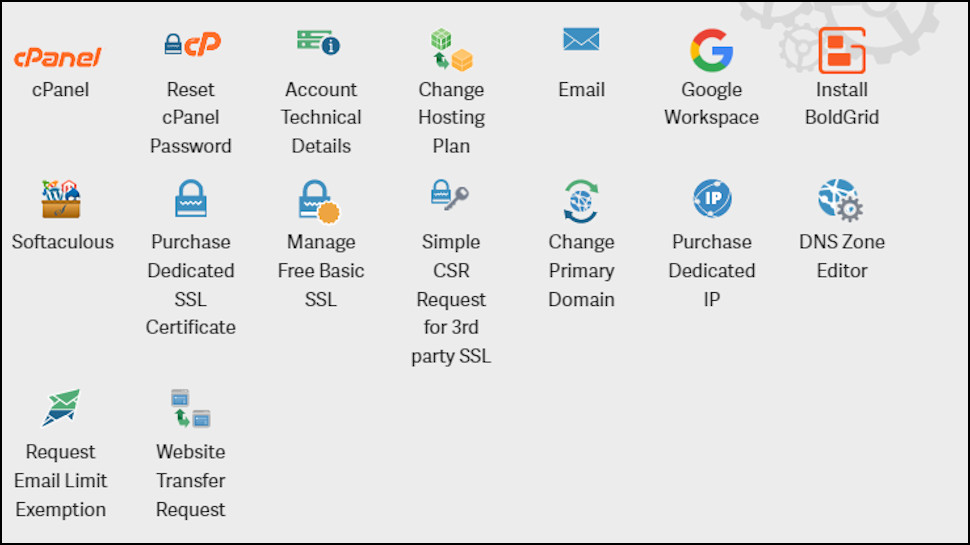
InMotion Hosting's customer account panel looks more appealing than most, with the usual text links replaced by 30+ colorful cPanel-like icons. Unfortunately, many of these are for functions you'd use rarely, if ever. Add another credit card; buy or transfer in a new domain; buy a Sucuri website security package; read InMotion Hosting's GDPR statement. These should be tucked away in a menu, not permanently taking up valuable screen real estate as though you might need them every day.
There's a separate set of icons for each hosting package you have, but they share a similar problem. There are some useful shortcuts, for example to launch cPanel, or Softaculous to install WordPress or hundreds of other apps. But many of the others are less helpful. How often do you think you'd use functions like 'Request Email Limit Exemption' or 'Simple CSR Request for 3rd party SSL', for instance?
Fortunately, you don't have to spend long in the account panel. One click launches Softaculous, you can have WordPress ready to go within a minute or two, and the excellent cPanel has all the email, file, database and other management tools you need to get your site running smoothly.
How fast is InMotion Hosting?
We began our performance tests by signing up for an InMotion Hosting shared plan, then setting up a simple WordPress website based on a standard template.
Next, we measured our server's core WordPress performance. These are several segments of server performance vital to how well it can handle WordPress websites. Finally, we use the SIege testing tool to see how the website performs under increase loads of concurrent users.
|
CPU & Memory |
Operations with large text data |
10 |
|
Random binary data operations |
6.93 |
|
|
Recursive mathematical calculations |
6.16 |
|
|
Iterative mathematical calculations |
8.34 |
|
|
Filesystem |
Filesystem write ability |
9.82 |
|
Local file copy and access speed |
10 |
|
|
Small file IO test |
9.8 |
|
|
Database |
Importing large amount of data to database |
10 |
|
Simple queries on single table |
10 |
|
|
Complex database queries on multiple tables |
7.08 |
|
|
Object Cache |
Persistent object cache enabled |
0 |
|
Network |
Network download speed test |
10 |
|
Overall |
Your server score |
8.5 |
|
CPU & Memory |
Operations with large text data |
4.9 |
|
Random binary data operations |
6.38 |
|
|
Recursive mathematical calculations |
4.07 |
|
|
Iterative mathematical calculations |
6.01 |
|
|
Filesystem |
Filesystem write ability |
8.23 |
|
Local file copy and access speed |
8.45 |
|
|
Small file IO test |
9.92 |
|
|
Database |
Importing large amount of data to database |
7.12 |
|
Simple queries on single table |
9.18 |
|
|
Complex database queries on multiple tables |
3.14 |
|
|
Object Cache |
Persistent object cache enabled |
0 |
|
Network |
Network download speed test |
10 |
|
Overall |
Your server score |
6.1 |
In our core benchmark tests, InMotion Hosting's shared plans held up better than most others we've seen. Not only did it handle processing jobs quickly, but it also had robust database and filesystem performance.
What was a little unusual, though, was its benchmark results in the VPS space. This was primarily held down by mediocre performance in the CPU and memory space. However, the overall VPS benchmark score of 6.1 is still fairly decent and held its own against even cloud VPS providers like Cloudways.
Still, for four CPU cores running at 2.7 GHz, I expected a bit better performance.
|
Concurrent users |
5 |
9 |
15 |
|
Transactions |
2311 |
4119 |
6756 |
|
Availability |
96.25 |
96.15 |
96.31 |
|
Elapsed time |
299.49 |
299.2 |
299.48 |
|
Data transactions |
25.08 |
44.12 |
70.4 |
|
Response time |
0.64 |
0.64 |
0.66 |
|
Transaction rate |
7.72 |
13.77 |
22.56 |
|
Throughput |
0.08 |
0.15 |
0.24 |
|
Concurrency |
4.96 |
8.8 |
14.83 |
|
Successful transactions |
2247 |
3966 |
6501 |
|
Failed transactions |
90 |
165 |
259 |
|
Longest transaction |
4.33 |
5.41 |
7.28 |
|
Shortest transaction |
0.09 |
0.09 |
0.09 |
InMotion Hosting's performance under increasing user load was a bit surprising. Given the excellent core benchmark results, we expected it to handle user loads relatively well. However, we observed failing transactions even on a minimal 5-user load. Even stranger was the fact that the longest transaction times, even under heavy loads, weren't that high.
It's entirely possible that some of these failed transactions are due to the shared hosting servers' internal safeguards, rather than to specific performance issues.
What is InMotion Hosting's support like?
InMotion Hosting offers 24/7 US-based support via phone, email and live chat, a web Support Center, a customer exclusive Knowledge Base and community forums.
Their website has a 5,000+ articles, guides and tutorials on the full range of hosting topics, way more than you'll see with most providers. The search engine doesn't do a good job of sorting its results by relevance, so it might take some scrolling to find what you need, but there is a lot of detailed and helpful content to explore.
They also have a Customer Exclusive Knowledgebase which is constantly being updated with new guides. Customers must be logged into their AMP to access the knowledgebase.
Ticket support wasn't the fastest we've seen, with replies to even relatively basic product queries taking around four hours. These typically pointed us in the right direction, though sometimes didn't have all the details we'd expect.
Fortunately, live chat gave the best results. We found responses were speedy and helpful, and the agents were able to give us useful answers to any extra questions we asked.
Final verdict
Whether you're a total website newbie or a big business running a huge and high-traffic web store, InMotion Hosting has a fast and feature-packed product which can help. A must for your web hosting shortlist.
InMotion Hosting FAQs
What payment types does InMotion Hosting support?
InMotion Hosting accepts payment via credit or debit card, PayPal and U.S. purchase order or check.
Does InMotion Hosting offer refunds?
InMotion Hosting has a '100% satisfaction guarantee' which promises your money back if you ask for it within a very generous 90 days.
There are some exceptions. There's 90 days of protection for all shared hosting, 6 month and longer VPS and reseller hosting packages. But dedicated servers and monthly-billed VPS and reseller plans get 30 days.
Most hosts only give 30 days across the range, though, so even taking the small print into account, InMotion Hosting tramples over the rest.
Does InMotion Hosting have an uptime guarantee?
InMotion Hosting's website doesn't quote an uptime guarantee for shared hosting. Most hosts do a little more, typically claiming 99.9%, and with some explanation of how this is calculated and the compensation you might get if this isn't met.
The company looks to do better with VPS hosting, claiming each VPS is on a server 'with 99.99% uptime.' It doesn't use the word 'guarantee', though, and there's nothing in the small print to explain how this 99.99% is calculated or guaranteed.
Confusingly, the website quotes two figures for dedicated servers. At the top of the page it says servers are on a '99.99% uptime Tier 1 network'; at the bottom, it says current network uptime is 99.999%. Again, there's no mention of a guarantee.
We prefer hosts to offer more clarity, and offer compensation if expected uptime isn't met. For example, Scala Hosting's Uptime Guarantee says customers get all their monthly fees back if unscheduled downtime is greater than 1% (that's more than around 7 hours 18 minutes).
Where are InMotion Hosting's data centers?
InMotion Hosting has two US-based data centers in California and Virginia. It also provides another data center in Amsterdam. Even shared hosting users can choose which data center should host their website.
What is my InMotion Hosting IP address?
If you need to connect your InMotion Hosting site to a domain managed elsewhere, it can help to find your web server's IP address.
To locate it, first log into the InMotion Hosting account management panel.
Scroll down and find your hosting plan in the list (it'll appear under your domain name).
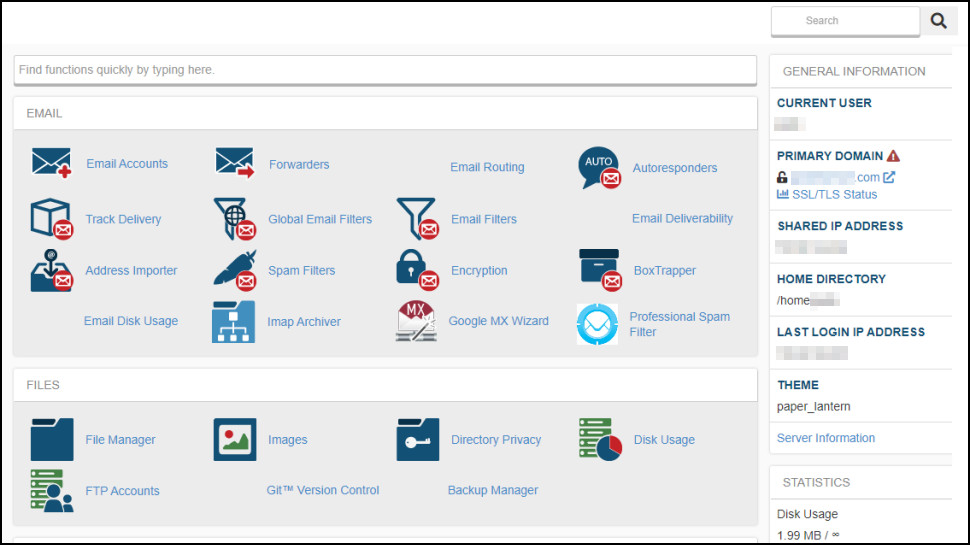
Find and click your plan's cPanel icon (probably top left in the list.)
Your server IP address appears in the General Information panel on the left, in the 'Shared IP Address' box.
If you can't see a General Information panel, click the Server Information link, and look for the 'Shared IP Address'.
What are InMotion Hosting's nameservers?
InMotion Hosting's nameservers are ns1.InMotionhosting.com and ns2.InMotionhosting.com.
How do I cancel an InMotion Hosting product?
Point your browser at www.InMotionhosting.com, click Login top-right of the page, and log in using your regular InMotion Hosting credentials.
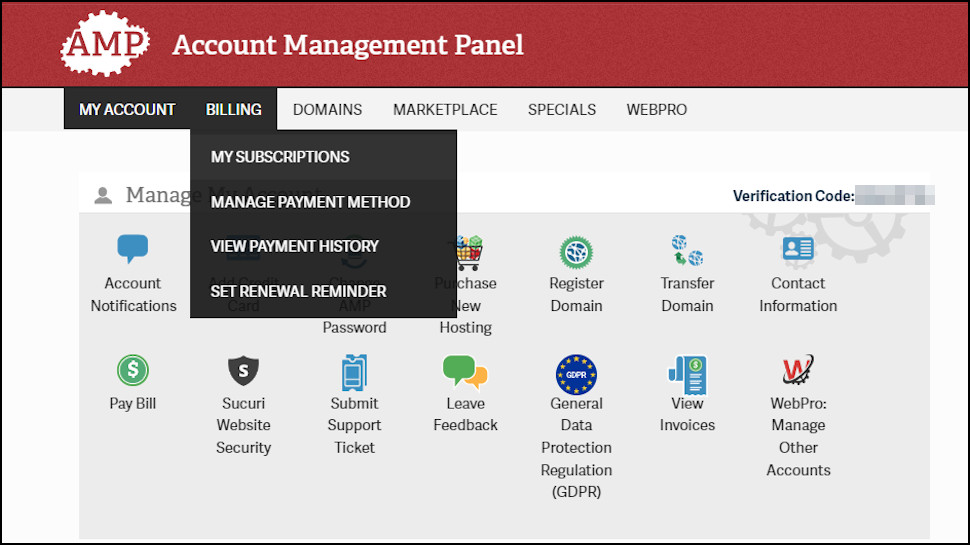
Click Billing, My Subscriptions.
If you see a red cross to the right of the subscription you'd like to cancel, click it and fill in the cancellation form. Your plan will remain active, but it won't renew and you won't be willed again.
If the Cancel column includes the text 'Set to Manual Renewal', the plan already has its 'auto-renew' setting turned off. You'll still receive email reminders just before the subscription is due to end, but if you're not interested, you can just ignore these and leave the account to expire.

0 comments:
Post a Comment